

If you’ve never managed a website before, this guide is for you. The right hosting for beginners is all about simplicity, reliability, and not needing a tech degree to get your site online. Here, you can learn how to host a website, along with how to choose the easiest hosting for beginners.
What is Web Hosting?
Web hosting is a service that allows your website to be accessible on the internet. When you buy a hosting plan, you’re essentially renting space on a server where your site’s files and content are stored so visitors can view them from any device, including smartphones.
Hosting providers also manage essential behind-the-scenes tasks, such as maintaining server reliability, enhancing security, performing regular backups, and ensuring your website loads quickly and smoothly.
How to Host a Website for Beginners (5 Simple Steps)
You want to launch your website, and hosting a website is simpler than it seems. You don’t need many technical skills, coding knowledge, or an IT background. What you need is a clear, step-by-step process that walks you through exactly what to do.
The following shows how to host a website, step by step.
Let’s get started.
Step 1: Select a Web Hosting Type
Before choosing a hosting provider, you need to understand which hosting type best fits your site.
Main Types of Web Hosting
There are six key web hosting types you need to know:
| Type | Pros | Cons | Best for |
| Shared Hosting | • Cheap • Beginner-friendly • No maintenance needed | • Slower performance during high traffic • Less control over configuration • Shared security risks | • Personal blogs • Portfolios • Small business websites |
| VPS Hosting | • More resources than shared hosting • Better performance • More control over server settings | • More expensive than shared hosting | • Growing sites • Medium businesses |
| Dedicated Hosting | • Maximum performance and reliability • Full control over server configuration • Strongest security potential | • Expensive • Complex management | • Large enterprises • High-traffic websites • Sensitive data sites |
| Cloud Hosting | • Highly scalable • Fast global speed • Pay-as-you-go pricing | • Pricing can be confusing | • Fast-growing websites • International businesses |
| WordPress Hosting | • Pre-installed WordPress • Automatic updates • Optimized for WP speed and SEO | • Slightly more expensive than basic shared hosting • Only useful for WordPress sites | • Businesses committed to WordPress • Bloggers • WooCommerce sites |
| Website Builder Hosting | • Very easy setup • All-in-one solution (hosting + builder) • No coding needed | • Less design/functionality flexibility • Hard to migrate away • Limited customization | • Beginners wanting a fast launch • Small simple websites |
Shared Hosting:
Shared hosting is the most common and is widely considered the easiest hosting for beginners. It’s affordable and simple to use, and requires little to no technical knowledge to get started. With shared hosting, your website is hosted on a server alongside many other websites, sharing the same resources, including storage, bandwidth, and processing power.
Most shared hosting plans are very low-cost, often starting under $5 per month. However, because resources are shared, your site’s performance can be affected if another website on the same server experiences a sudden traffic spike. Shared hosting also carries some security risks: if another site on the server is compromised or blacklisted by search engines, it may impact your site as well.
VPS Hosting:
VPS hosting is an upgrade from shared hosting. While your site still shares a physical server with others, though, that server is divided into multiple private virtual environments, each with dedicated resources. This separation improves speed, stability, and security compared to shared hosting. VPS hosting strikes a balance between affordability and performance.
Dedicated Hosting:
This type provides an entire physical server for your website. Dedicated hosting gives you full access to the server’s storage, bandwidth, and computing power, making it one of the most secure hosting options.
Dedicated servers can support millions of visitors and large-scale file storage requirements. They are often used by organizations that handle sensitive data or require strict compliance, such as healthcare providers and large ecommerce platforms.
The downside is cost and complexity. Dedicated hosting plans typically cost hundreds of dollars per month, and managing the server requires advanced technical expertise unless you pick up a managed plan.
Cloud Hosting:
Cloud hosting works differently from traditional hosting by using a network of interconnected servers across multiple data centers worldwide. Instead of relying on a single physical server, your website is distributed across multiple servers.
Cloud hosting is especially useful for websites with unpredictable traffic or rapid growth, because resources can automatically scale up or down as needed. It also offers strong redundancy: if one server goes offline, another takes over to keep your site running.
Cloud hosting pricing varies widely depending on usage, but it’s generally more affordable than dedicated hosting and often flexible enough to pay only for what you need. Performance is often great, particularly for global audiences, since visitors are served from the data center closest to their location.
WordPress Hosting:
WordPress hosting is a specialized hosting service designed for WordPress websites. WordPress is open-source software that lets you create, organize, and manage website content without writing code, making it one of the easiest platforms for beginners and small businesses.
Many WordPress hosting plans are essentially shared hosting environments optimized for WordPress. So, they offer the affordability of shared hosting while providing additional tools and performance enhancements tailored to WordPress sites.
One of the biggest advantages is convenience. WordPress hosting providers like WPX usually include WordPress pre-installed, so you can start building your site immediately. Many hosts also handle automatic updates to the WordPress core software, and some even update plugins and themes for you.

WPX – Managed WordPress Hosting Service
In many cases, WordPress hosting is recommended as the easiest hosting for beginners focused on WordPress sites. It is a great choice if you’re certain WordPress is the platform you want to use, and you’d rather not worry about installing, updating, or optimizing the CMS yourself. It offers an easy, beginner-friendly way to launch a WordPress site with minimal technical effort.
Website Builder Hosting:
Website builder hosting is designed for those who want the simplest and fastest way to create a website. Popular platforms like Wix and Squarespace have made this type of hosting especially common by offering all-in-one solutions that combine hosting with easy visual design tools.
Website builders require almost no technical setup. You don’t need to install software, manage updates, or configure server settings. Everything is built into the platform, allowing you to focus entirely on designing your site.
However, website builders are often less flexible, especially for advanced customization. Due to their proprietary nature, it can be difficult to move your site to another host later if you decide to switch providers.
How to Select a Web Hosting Type
A quick guide to choosing the right type of web hosting for your business:
Choose shared hosting if your website is small and simple. If you’re building a personal portfolio, a small business site with modest traffic, or any project that requires minimal setup and maintenance, shared hosting is a suitable option. This type is ideal if you want to go online quickly without managing servers.
Choose VPS hosting for growing or data-heavy websites. VPS hosting is best for medium-sized businesses or more complex websites that require higher storage limits, more bandwidth, greater server customization, and improved performance and stability. Pick VPS hosting if you expect higher traffic or need more control over your hosting environment.
Choose dedicated hosting for large businesses with advanced needs. Dedicated hosting is designed for websites that require maximum performance, security, and customization. It’s the most expensive option, but it provides a dedicated physical server for your site.
Choose cloud hosting for rapid growth or global audiences. It works especially well for international companies, websites with unpredictable traffic spikes, small businesses expecting rapid growth, and high-traffic sites requiring strong global uptime.
Choose WordPress hosting if you’re committed to WordPress. WordPress hosting is a better option if you are sure WordPress will be your website platform. These plans often include valuable WordPress-specific features such as guided setup, automatic WordPress updates, performance optimizations, and support from WordPress experts.
Choose website builder hosting if you want maximum ease of use. Website builder hosting is best for people who want to launch a site fast using drag-and-drop tools.
Step 2: Pick a Hosting Package
Hosting prices can vary widely, and it can be difficult to compare plans because each company structures its packages slightly differently. The best way to avoid overpaying is to understand the factors that influence hosting costs and the features you actually need.
Start With Your Website Platform
The platform you use to build your website is one of the biggest factors affecting hosting cost.
- If you use a proprietary website builder, such as Wix, hosting is often bundled with the plan. In that case, you’re paying not only for server space but also for access to the builder’s design tools, templates, and software.
- If you use an open-source CMS like WordPress.org, you can choose almost any hosting provider and simply pay for hosting. The CMS itself is separate from your hosting plan, giving you more pricing options.
Understand the Hosting Model You’re Paying For
The hosting type you select directly affects pricing, as it determines the amount of computing power and server access your website receives. Review step 1 again to understand the hosting model you want to pay for.
Match your needs to the right hosting package. If you are launching a small personal website, a basic shared hosting plan is usually sufficient. For professional business sites, managed WordPress hosting or higher-tier hosting options provide better performance and support. Shared hosting remains the most affordable choice, while shared and managed WordPress plans are generally the easiest hosting for beginners.
If your site is complex, high-traffic, or growing quickly, you’ll benefit most from cloud hosting or a managed VPS.
Decide If You Need Managed Hosting
Another major cost factor is whether your hosting plan is managed or unmanaged. Managed or unmanaged hosting explains how much responsibility you want to take on.
- Managed hosting: The provider handles essential server tasks for you, including setup, software updates, backups, security patches, performance monitoring, and, in some cases, malware cleanup. This is the recommended option for most beginners and small business owners because it removes the technical burden and lets you focus on running your site rather than maintaining a server.
- Unmanaged hosting: It gives you full control, but you’re responsible for everything: configuration, maintenance, troubleshooting, and protection against attacks. This is best suited for developers or technically experienced teams.
For example, you can purchase a managed WordPress for simplicity or an unmanaged WordPress hosting if you want full control.
In general, if you don’t want to manage a server yourself, managed hosting is the safer, easier, and more beginner-friendly choice, even if it costs slightly more. Managed hosting is popular among most site owners and is widely regarded as the easiest hosting for beginners. The provider handles the infrastructure while you focus on content, marketing, or running your business.
Evaluate Server Resources
Servers rely on:
- CPU
- RAM
- Storage capacity
Hosting plans differ in the amount of server power they provide. The more resources your site needs, the higher your hosting cost will be, especially if you expect high traffic, large media files, or complex functionality.
A simple landing page may only require a few hundred megabytes. A WordPress blog often needs several gigabytes. Online stores and photography-heavy portfolios require even more space due to product catalogs and large media files.
Compare Plan Features, Limits, and Hidden Costs
Beyond basic resources, hosting packages include different plan features, such as:
- Bandwidth allowances
- Number of websites supported per plan
- Database caps
- Server response speed
- Built-in security tools (firewalls, malware scans, backups, DDoS protection)
Bandwidth, in particular, refers to the amount of data your server transfers to visitors each month. Even small sites can consume more bandwidth than expected, especially if pages include large images or interactive content. Also, keep in mind that many hosts offer “unlimited bandwidth,” but most still enforce fair-use limits.
Not all hosting companies include the same features by default. Some providers reduce the advertised cost by turning common “standard” tools into paid add-ons, such as backups, malware protection, or email hosting. Check what’s bundled upfront so you don’t end up paying more later.
Consider Contract Length and Renewal Pricing
Many hosts offer steep discounts if you pay for one or more years upfront. This can lower your monthly rate.
In some plans, introductory pricing may increase significantly at renewal, so ensure the provider is transparent about long-term costs.
Look for Bundled Value
The best and easiest hosting for beginners should include helpful extras in their complete packages that reduce long-term costs, such as:
- Free SSL certificates
- Automated backups
- Security monitoring
- Migration services
These bundled features prevent you from constantly paying for add-ons later.
Don’t Overlook Customer Support
Support quality is an important part of hosting value. Plans with trained staff and multiple support options (live chat, phone, email) may cost more but can save you major headaches during downtime or technical issues.
Step 3: Choose a Web Hosting Provider
If you’re still unsure whether a web hosting provider is worth it, here are the key factors beginners should look for in hosting:
Uptime
Most reputable hosts offer an industry-standard 99.9% uptime guarantee, meaning your site should be down forno more than a few hours per year.
Performance
Quality hosting providers improve performance through:
- SSD or NVMe storage
- Optimized server software like LiteSpeed
- Built-in caching tools
- Content Delivery Network (CDN) support. (A CDN is especially important if you serve visitors in multiple countries.)
Security Features
Hosting providers must protect your site against malware, bots, and hacking attempts. At a minimum, a host should include:
- Free SSL certificates
- Firewalls that block malicious traffic
- Malware scanning and threat detection
- DDoS protection
- Automatic backups
With billions of malware attacks happening globally each year, hosting security is one of the most important investments for any business.
Ease of Use
The best hosting providers offer a simple checkout and setup process, clear account dashboards, and easy access to billing, backups, domains, and email tools.
Customer Service
Reliable customer support is very critical.
- 24/7 customer support with multiple contact options
- Fast response times
- Skilled technicians
These things are key elements of the best and easiest hosting for beginners.
Scalability
Your hosting should support your website as traffic increases. A provider should make it easy to upgrade from a small plan to enterprise-level infrastructure or from shared hosting to VPS hosting.
Scalability is especially important for startups, ecommerce sites, and businesses that experience seasonal spikes. Consider hosts with clear upgrade paths and resource-monitoring dashboards to scale proactively.
Pricing
Many hosting plans advertise extremely low introductory prices, but those rates often increase significantly after the first term. Keep in mind to compare:
- Introductory vs. long-term costs
- What features are included vs. paid add-ons
- Whether essentials like backups and SSL cost extra
Predictable pricing and bundled security often save money over time.
Extra Features
Several hosting providers include additional services that make running a business website easier, such as:
- Free website migration
- Business email hosting (you@yourdomain.com)
- Multiple professional email accounts
- Optional design or setup consultations
Step 4: Register a Domain Name
Hosting provides the actual space where your website lives, while a domain name serves as the website’s address. The domain connects users to the correct server through IP addresses and nameservers, making it easier for visitors to find your site without needing technical details. Both hosting and a domain are necessary for a fully functioning website.
Before your website can go live, you need a domain name – your site’s official address on the internet. This is what people type into their browser to find you (such as yourbusiness.com). You can change domains later, but it’s best to choose carefully from the start.
How to Buy a Domain Name
Domain registrars specialize in selling and managing domain names. When you visit one, you can check whether your preferred name is available and choose from different domain extensions, such as .com, .net, or .org.
Not every domain can be purchased – only names that haven’t already been registered by someone else. Most registrars provide suggestion tools that offer similar names or alternative suffixes.
Web hosting companies such as WPX often include domain registration in their packages. Some web hosts don’t offer domain registration at all, meaning you may need to buy your domain separately and connect it later.
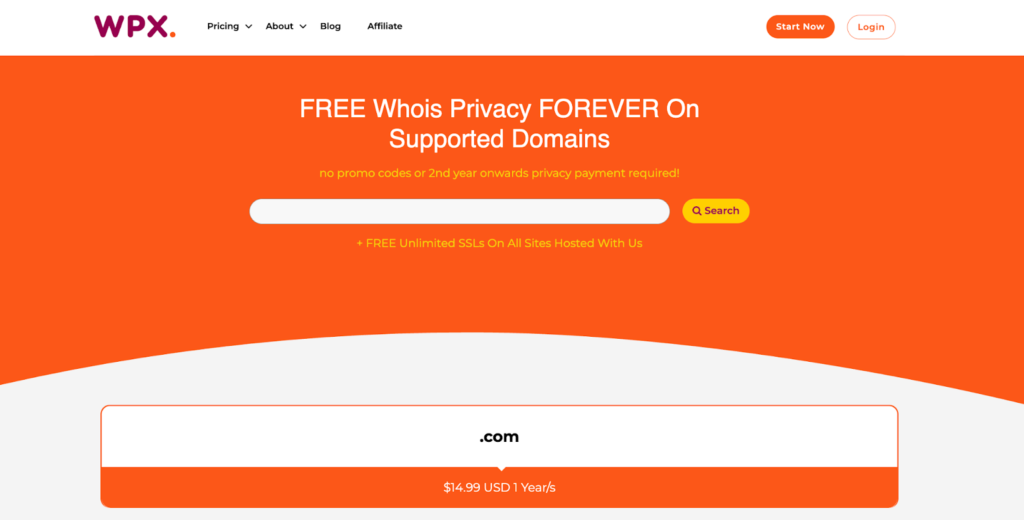
Buy a domain name directly on the WPX website
Domain registration costs vary widely depending on the name and extension. Some domains cost as little as a few dollars per year. Premium ones can be extremely expensive if someone already owns them.
Registrars typically offer domain registration for one-, three-, or five-year terms. For most beginners, registering for one year initially is a safer choice until you’re confident in your long-term plans.
Tips to Choose the Right Domain Name
- Domain names have only a few technical rules, but the best ones follow strong branding principles.
- Shorter names are typically better. Short, catchy names tend to perform best because people remember them more easily.
- A good domain should be easy to pronounce, spell, and remember. Ideally, it should match your business name as closely as possible.
How to Pick the Best Domain Extension
The extension is the part after the dot, such as .com, .net, or .org. For most businesses, .com remains the most trusted and recognizable option worldwide.
That said, niche extensions such as .shop and .tech are becoming more common, especially for brands seeking a modern or industry-specific identity. Keep in mind that some extensions cost more than others, and certain ones, such as .gov, are restricted to specific organizations.
Step 5: Connect Your Domain to Your Hosting Account
Before your site can appear online, your domain name must point to your hosting server. This is done through DNS settings.
If you bought your domain and hosting from the same provider, this connection is often automatic. If you purchased them separately, you’ll need to update your domain’s nameservers in your registrar dashboard so the domain points to your host.
WPX: The Best and Easiest Hosting for Beginners
If you’re a beginner looking for hosting that’s simple, fast, and stress-free, WPX is one of the best choices. WPX focuses on making WordPress hosting easy, secure, and fully supported, perfect for first-time website owners.
Beginner-Friendly Setup:
WPX is designed for people who want to launch a WordPress site quickly without having to deal with complex technical steps.
- WordPress installs in just a few minutes
- The dashboard is clean and easy to use
- Simple setup process
Extremely Fast Support:
- 24/7 customer support
- Live chat responses in under 30 seconds
- Real support agents
Free Website Migration Included:
- Free professional migration
- Their team moves your site for you
- No downtime, no stress
You don’t need technical skills to transfer your website.
Built-In Speed Optimization:
WPX is built for performance, which helps both user experience and SEO. Even without extra caching plugins, WPX includes:
- Fast WordPress-optimized servers
- A custom high-speed global CDN
- Strong performance tuning out of the box
Strong Security and Daily Backups:
- Free SSL certificates on all sites
- Malware scanning and removal
- Automatic daily backups
- Hybrid DDoS protection
Simple Pricing with Premium Features:
WPX’s managed WordPress hosting costs are included:
- Expert support
- Speed tools and CDN
- Free migrations
- Daily backups
- Security features
- No hidden fees
Who Should Choose WPX?
- First-time website owners
- Bloggers who want fast performance
- Small business websites
- Affiliate marketers
- Anyone who wants reliable hosting without technical stress
Ready to go live? Launch your site with WPX!
Final Words
Initially, you don’t need the most expensive plan or every fancy feature. You need the hosting that gets out of your way so you can focus on building your website.
If you’re still feeling uncertain, that’s completely normal. The good news is that most hosting providers offer money-back guarantees, so you can test the experience risk-free.
Choosing a hosting is not a permanent, life-altering decision. You can always migrate to a different provider later if your needs change or you outgrow your current plan. Pick a beginner-friendly host, sign up, and start building. You’ve got this.
Frequently Asked Questions
Have another question?
Thanks to modern tools that handle the technical heavy lifting, you don’t need to worry about web hosting. Many hosts offer one-click installs for platforms like WordPress, allowing you to launch a website in minutes. Managed hosting services handle security updates, backups, and server maintenance automatically, while intuitive dashboards — such as cPanel or custom control panels — make managing domains, email, and settings simple and beginner-friendly.
WPX is one of the best Managed WordPress hosting options for beginners. WPX offers easy WordPress setup, very fast customer support, free website migration, and strong security features.
You do not even need technical skills to host a website today. Modern no-code platforms and managed hosting services have removed the barriers that once required coding or server management. Website builders like Wix and Squarespace use drag-and-drop editors, meaning that if you can use a word processor, you can build and host a site. Alternatively, with beginner-friendly managed hosting like WPX, you can install WordPress and launch your website in just a few clicks, with security, backups, and updates all handled for you.
To host a website, you need a domain name (such as yoursite.com), a hosting provider like WPX, a website platform like WordPress, and basic content such as pages and images.
Yes. WPX offers free professional website migration. Their team will transfer your website from your old host with no downtime, which is very helpful for beginners.