A good website maintenance plan ensures a secure and updated site, which will, therefore, contribute to long-term stability in a business. Having a structured maintenance plan guides with the best practices related to security, performance, and optimization to ensure the reliable and efficient functioning of the site.
What Is Website Maintenance?
Website maintenance is the ongoing process of monitoring, updating, and improving a website. The goal is to keep it secure and functional. From there, the website can provide a positive experience for visitors. With consistent website maintenance, you can prevent problems before they occur and keep your site optimized for both users and search engines.
Why Website Maintenance Is Important
Website maintenance is critical for the long-term success and effectiveness of your website.
Website maintenance is vital for the following reasons:
- Security: According to a report published by Sapio Research and Deep Instinct, 75% of security practitioners have reported an increase in attacks over the previous year, with 85% attributing the increase to malicious actors using generative AI. Regular updates and security patches are very important for the survival of the website against hackers, malware, and other cyber threats.
- Performance: Images should be optimized, code cleaned up, and broken links repaired to create fast-loading pages and ultimately better-performing pages.
- UX: Keeping your site free of errors and current encourages visitors to stay longer and engage more with your content.
- Functionality and Adaptability: Routine upkeep ensures all features work correctly and that your site remains compatible with new devices, browsers, and technologies.
- Reputation and Credibility: As a site owner, you want to present a professional face to your visitors. A well-maintained site can improve professional image and credibility in your brand.
- Cost Efficiency: With the global average cost of a data breach at $4.4 million, proactive maintenance can help prevent major and costly issues, such as security breaches or site crashes.
A website maintenance plan is a structured approach (often a service or a set of procedures) that helps ensure your website stays maintained and up to date. It is a forward-thinking approach to managing your website that helps avoid issues such as security vulnerabilities and performance issues.
Components of a Website Maintenance Plan
Many of the website maintenance tasks can be automated or performed with tools and plugins.
1. Technical & Core Maintenance
Keep your site secure.
Software Updates
Make sure your Content Management System (CMS), plugins, and themes are always up to date. Outdated software is one of the easiest ways for hackers to break in, since older versions can have security holes that let them slip in malware or take control of your site.
Beyond security, updates often include performance improvements, bug fixes, and new features. Set up automatic updates and manual checks to ensure compatibility with other plugins and your website design.
Backups
Backups let you restore your website quickly in the event of hacking or accidental deletion. These should include both the website files and the database. A backup is only useful if you know it works when needed.
Uptime Monitoring
Using uptime monitoring tools, you don’t have to worry anymore about unexpected website downtime. They continuously check whether your site is accessible. If the website goes offline, these tools immediately send alerts.
Database Optimization
You should clean, index, and optimize your database regularly to ensure faster queries and an overall better experience for your users. Over time, your database will accumulate unnecessary data, such as spam comments, old post revisions, and transient data. Use some plugins or database management tools to help you safely and effectively delete unnecessary data.
Broken Link Checks
You might (or might not) know, broken links, either internal or external, are frustrating, which harm SEO rankings and reduce credibility.
2. Security and Compliance
If you want to ensure your website is protected from cyber threats and meets all legal requirements, always include a security and compliance plan. In a small business, a single administrator can handle scans, firewalls, and certificate management. Meanwhile, in larger organizations, responsibilities can be distributed among IT staff or security specialists.
Security Scans and Malware Removal
To prevent data breaches, protect user information, and avoid costly downtime.
Security scans frequently help detect and remove malicious code, viruses, and other security vulnerabilities. In general, complete this task at least weekly and address any issues detected immediately.
Firewall Management (WAF)
A Web Application Firewall (WAF) protects against different attacks, including SQL injection, cross-site scripting (XSS), and DDoS.
SSL Certificate Management
Keep SSL certificates current to protect sensitive data.
User Management
Manage user access and implement strong security measures.
Legal Compliance
Follow GDPR and WCAG standards.
3. Performance and Speed Optimization
Deliver a seamless user experience.
Page Speed Testing
It helps identify bottlenecks and areas for improvement. Pay attention to metrics like First Contentful Paint (FCP) and Largest Contentful Paint (LCP).
Check out How to test the speed of your website properly
Image Optimization
Reduce and resize images while maintaining quality. Adopt contemporary image formats, enable lazy loading, and streamline optimization through plugins or server tools.
Code Minification
Minify and combine code files to reduce HTTP requests and speed up page loading.
Cache Configuration
Configure caching to store website elements locally.
4. Content and Functionality
Keep your website’s content and functionality up to date.
Content Updates
Update products, blogs, and contact information.
Form & Feature Testing
Contact forms, subscription sign-ups, e-commerce checkout processes, and others must function correctly.
Cross-Browser & Device Testing
Websites must display and operate consistently across multiple browsers and devices.
5. Analytics and Strategy
Have an organized plan for analytics and strategy.
Performance Reporting
Key metrics: website traffic, conversions, bounce rates, and user engagement. Set up automated monthly reports.
SEO Monitoring
Monitor search rankings, check for broken links, and assess on-site SEO components.
Analysis of User Behavior
A better user experience based on actual user behavior will improve engagement and increase conversions.
Website Maintenance Plan Pricing
The main goal of a website maintenance plan is to ensure your site remains secure, functional, and optimized.
If you run a small business, you can deal with website maintenance on your own if you’re a technical person. Alternatively, you can hire freelancers or small agencies. See our breakdown of DIY website maintenance costs and the cost of hiring a freelancer for small business website maintenance here.
Below, explore the cost of website maintenance plans offered by service providers, detailing the services included.
Basic Maintenance Plan
This package is usually best for small businesses, personal websites, or blogs with a basic structure.
Features include:
- Daily/weekly backups
- Security updates for the CMS, plugins, and themes
- Basic monitoring for uptime and technical issues
Pricing: $50 to 150/month
Intermediate/Standard Maintenance Plan
This package is for businesses that have a more active online presence.
Features include:
- All services from the Basic Plan
- More frequent backups
- Content support
- Basic SEO monitoring and optimization
- Site speed optimization
- Security scans
Pricing: $150 to $400/month
Advanced/Enterprise Plan
This full-service solution targets more complex websites like e-commerce platforms and sites needing constant development support.
Features include:
- All services from the Intermediate Plan
- 24/7 security monitoring
- Advanced security protocols and malware removal
- Continuous uptime monitoring
- Custom development and bug fixes
- Detailed performance optimization
- Ongoing SEO strategy and implementation
- Support for integrations like payment gateways
- Reporting and analytics
Pricing: $400 to $1,500+/month
Website Maintenance Included with Hosting Plan
While you can manage updates, backups, and performance manually, you could be losing valuable time and maybe exposing your site to risks if you haven’t switched to a hosting provider plan that includes maintenance. A hosting plan automates these critical tasks.
WPX WordPress hosting solution is a managed hosting service that handles essential tasks, including regular backups, security scanning, server monitoring, and system updates. You can select a plan that matches your company’s scale and visitor volume. It’s an efficient and practical solution, particularly for small businesses, individual bloggers, or new ventures.
Maintenance features across all plans include:
- 28 days automatic backups
- On-demand backups (personal backups)
- Daily malware scans
- Managed Web Application Firewall (WAF)
- Brute-Force protection
- Hybrid DDoS protection
- Automated WordPress & PHP updates
- Auto-renewing SSL
- 1-click SSL installations
- Advanced account security
- WHOIS privacy on domains
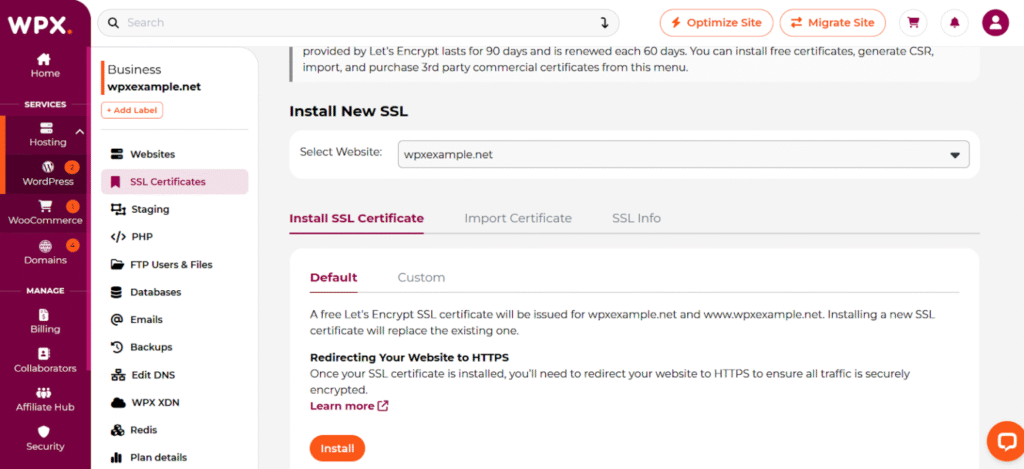
SSL Manager in WPX hosting
Useful Tools for Website Maintenance
There are several essential tools that greatly simplify and improve website maintenance.
| Category | Tool | Best For |
| Security | Sucuri | Protecting sites from hacks and malware removal |
| Wordfence | WordPress-specific security | |
| SiteLock | Automated security and ongoing monitoring for SMBs | |
| Performance & Monitoring | Pingdom | Monitoring website uptime |
| GTMetrix | Optimizing site speed | |
| PageSpeed Insights | Tracking performance metrics and improving page speed for SEO | |
| Analytics & SEO | Google Analytics | Understanding visitor behavior, monitoring traffic sources |
| Ahrefs | Improving SEO performance, competitor analysis | |
| SEMrush | Full SEO and marketing strategy management | |
| Database Management | FileZilla | Managing website files and server directories directly |
| phpMyAdmin | Advanced database management and troubleshooting | |
| Backup Solutions | UpdraftPlus | Automating backups and ensuring site recoverability |
| VaultPress (Jetpack Backup) | Real-time backup and recovery, security-focused backup solution |
Conclusion
Now it’s your turn: What is your website maintenance plan? How much are you currently spending on website maintenance? Do you find it worth the investment? For many business owners, bloggers, and entrepreneurs, the true cost of maintenance is also the time, energy, and potential risks saved. Sure, that monthly invoice might make you wince, but if your data vanishes, how much will it cost you?
Frequently Asked Questions
Have another question?
Website maintenance is the ongoing process of monitoring, updating, and improving a website. The point is to keep the website secure and functional. A website maintenance plan is a structured approach (often a service or a set of procedures) designed to maintain a website. It’s a proactive approach to website management, helping prevent issues such as security vulnerabilities and performance problems.
Website maintenance costs vary by site size. Small websites and blogs pay $50–$150 monthly for basic maintenance, small to medium business sites pay $150–$400 for intermediate plans, and large enterprise sites pay $400–$1,500 or more for advanced maintenance.
Regular updates to WordPress, plugins, and themes to prevent security vulnerabilities. Monthly backups and performance checks, including speed optimization and uptime monitoring. Security scans detect malware or unauthorized access early.