So you’ve decided to start a blog – congrats! Maybe you’re a complete beginner and don’t understand DNS settings. Or you’re a growing blogger who needs reliable hosting. Whatever your situation, this guide helps you find the best WordPress hosting for bloggers.
Do You Need Hosting for a WordPress Blog?
What Is Web Hosting?
Web hosting is a service that makes a website available on the internet. When you purchase a hosting plan, you are essentially renting space on a server so your website content can be viewed online from any device, including desktops, tablets, and mobile phones.
Hosting providers also handle many important behind-the-scenes tasks, such as maintaining server performance, managing security protections, creating backups, and ensuring your website loads efficiently.
Do You Need Hosting for a WordPress Blog?
WordPress hosting is a specialized web hosting service optimized for WordPress, providing the features and environment needed to keep your site fast, secure, and easy to manage.
Hosting is critical for any website. However, the type of hosting you need depends on which version of WordPress you choose: WordPress.com or WordPress.org.
WordPress.com includes hosting automatically, which means you do not need to find a separate hosting provider or manage technical setup. It offers an easy way to launch a website, even with no experience. However, customization is more limited. Plugins are not available on the free and personal plans; Google Analytics is supported only on Premium plans and above. Monetization options are available, but restricted.
WordPress.org, on the other hand, provides the WordPress software for free but requires you to arrange your own web hosting and domain through a third-party provider. This option is known as self-hosting WordPress.
With WordPress.org, you pay for hosting separately, and you have full ownership and control over your site content. Blog monetization is unlimited as long as it follows the terms of service. Plugins are fully supported, and Google Analytics can be installed at no cost, which is important for bloggers working with brands or influencer networks. Storage and backup options depend entirely on the hosting plan you choose, with many providers offering large or even unlimited storage at higher tiers.
In short:
- If you use WordPress.com, hosting is included, so you do not need to purchase a separate hosting plan or worry about technical server management.
- If you use WordPress.org, you need to arrange your own hosting through a third-party provider. You are responsible for selecting a hosting service, connecting your domain, and managing performance, backups, and security (often with support from your hosting provider). WordPress.org is best for serious bloggers, businesses, and anyone planning to monetize or customize their site extensively.
If you decide to use WordPress.org for more control, customization, and long-term growth, the rest of this article will help you understand what to look for when choosing the best WordPress hosting for bloggers.
How to Select the Best WordPress Hosting for Bloggers
Let’s be honest: you didn’t start blogging because you’re passionate about server uptime and bandwidth allocation. You need hosting that gets out of your way.
Let’s find you a hosting provider suitable for your WordPress blog based on these key factors:
Speed and Performance Optimization
If your hosting environment is not optimized for WordPress, this process can become slow and inefficient, leading to longer load times and weaker SEO performance. To stay competitive, bloggers should prioritize hosting services that offer performance-focused features designed specifically for WordPress:
- SSD or NVMe Storage: These modern storage technologies are much faster than traditional hard drives, allowing your site to load pages, images, and databases more quickly.
- Built-In Caching: Caching is necessary for reducing server workload. Instead of rebuilding every page for every visitor, caching stores pre-rendered versions of your pages so they can be delivered instantly. Server-level caching is far more efficient than relying only on WordPress plugins, making it a key feature to look for in quality hosting plans.
- LiteSpeed Server Technology: LiteSpeed is a modern, high-performance web server designed to efficiently handle WordPress. It processes PHP fast, manages high visitor loads with fewer resources, and improves overall site responsiveness.
- CDN Integration: A CDN improves global performance by storing copies of your blog on servers around the world. This means readers access your site from the nearest location, reducing latency and ensuring fast load times regardless of where your audience is located. Services such as Cloudflare are commonly integrated with popular WordPress hosts.
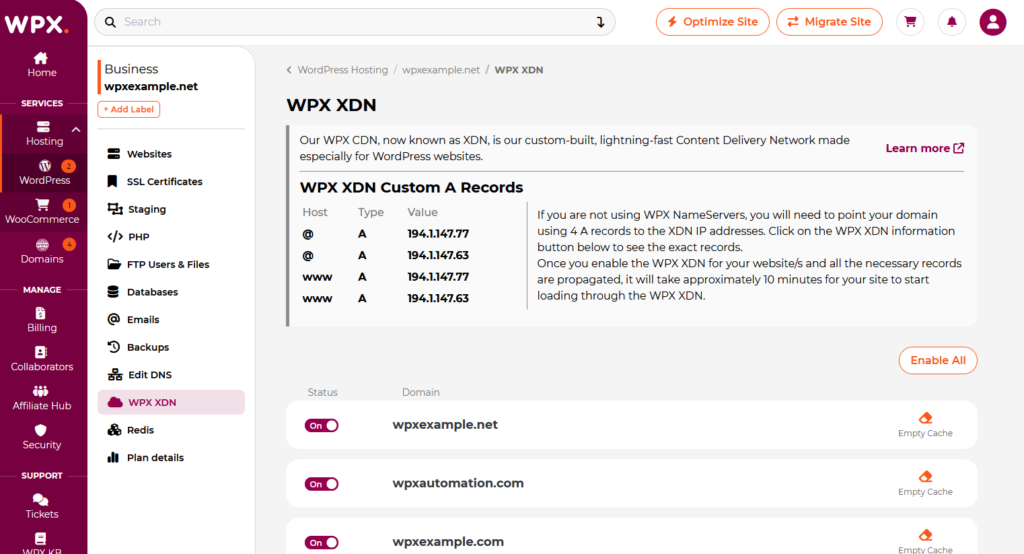
WPX CDN, or XDN, designed especially for WordPress websites
Security Features
Security is among the most critical factors when considering WordPress hosting services. Key security features to look for include:
- Free SSL Certificates (HTTPS Encryption): Without HTTPS, browsers like Chrome will label your site as “Not Secure,” which immediately reduces reader trust and can negatively affect SEO. The best WordPress hosting for bloggers often includes free SSL, ensuring your blog remains secure and professional.
- Malware Scanning and Threat Detection: Hosting companies with automated malware scanning can detect suspicious activity early, helping prevent your site from being infected or blacklisted.
- Web Application Firewalls (WAF): A firewall blocks common attacks such as SQL injection, brute-force login attempts, and harmful bot traffic before they reach your WordPress installation. This is especially important for bloggers who may not have the technical skills to manage advanced security settings.
- Automatic Daily Backups: Even with strong protection, errors and unexpected issues can occur. Daily or automated backups ensure you can quickly restore your site if it is hacked, corrupted, or accidentally broken.
Ease of Use
A user-friendly hosting experience lowers the barrier to entry for beginners and enables bloggers to go online quickly without advanced server knowledge.
Prioritize these factors below:
One-Click WordPress Installation:
When using WordPress.org, users will need to complete a few additional technical steps at the beginning, such as purchasing a domain name, selecting a hosting provider, installing WordPress, and configuring basic themes, plugins, and security settings. It sounds a bit complicated, right?
Still, most hosting providers now offer one-click WordPress installation, which means you are not required to have coding skills. You mainly need to navigate the dashboard, install plugins, and customize layouts through drag-and-drop tools.
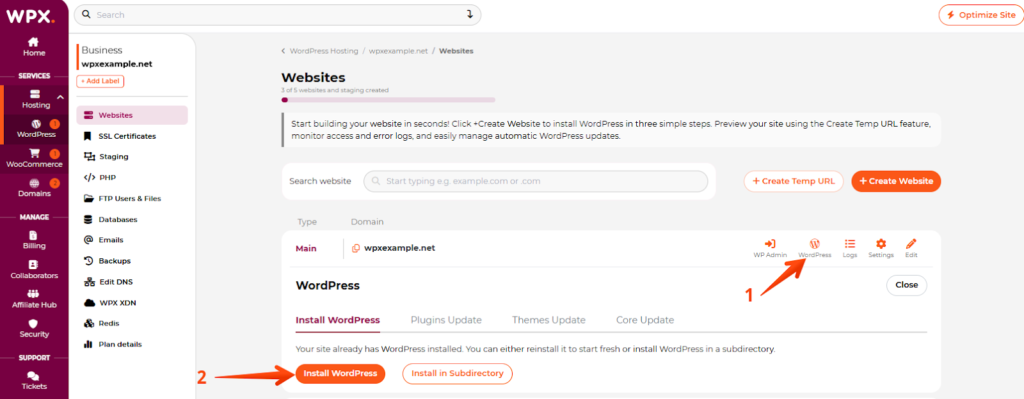
One-click WordPress setup on WPX Hosting
Instead of dealing with databases, manual uploads, or FTP tools, you can install WordPress with a single click, ideal for bloggers who don’t want to focus on technical configuration.
Intuitive Dashboards and Control Panels:
A clear, well-designed dashboard (such as custom control panels or systems like hPanel) helps bloggers manage everything in one place. This includes domains, email accounts, plugin settings, and site performance tools.
Staging Environments for Safe Testing:
Staging tools provide a private “sandbox” version of your blog where you can test new themes, plugins, or major design changes before publishing them live. When choosing the best WordPress hosting for bloggers, staging environments should be a feature to consider.
Managed WordPress Support
Choosing a managed WordPress hosting plan can significantly reduce the technical workload for website owners. With managed hosting, the provider handles most of the technical work required to keep your server and website running smoothly. With unmanaged hosting, you (or an IT professional you hire) are responsible for installing, configuring, updating, securing, and maintaining nearly everything yourself.
For most bloggers without technical teams, managed WordPress hosting is the ideal choice. Key benefits of managed WordPress support include:
- Automatic Core Updates and Security Patches: Managed hosts regularly update WordPress software to the latest versions, ensuring vulnerabilities are patched quickly.
- Built-In Security and Monitoring: Includes installed and maintained security tools, such as malware protection and firewall systems. Hosts also monitor for suspicious activity and respond to threats.
- Performance Optimization and Uptime Tracking: Managed WordPress hosting providers continuously monitor server performance, uptime, and resource usage. They tune the hosting environment specifically for WordPress, helping prevent crashes during high-traffic spikes.
- Automatic Backups and Recovery: Most managed WordPress hosting plans include scheduled backups, allowing bloggers to restore their site quickly if something breaks or becomes compromised.
Managed WordPress hosting is therefore valuable for serious bloggers and small businesses that do not want to invest in an IT department.
Customer Support
When your blog goes down, waiting hours for a response can cost you readers, revenue, and credibility. Look for:
- WordPress-Savvy Experts: Instead of generic agents reading scripts, you want hosting companies that may have WordPress experts on their customer support teams who can provide more advanced guidance and assistance.
- 24/7 Availability: If your blog experiences issues at midnight or during a viral moment, having access to support at any time provides peace of mind. Live chat or phone support is far more effective during emergencies than slow ticket-based systems.
Scalability
Your blog may start with only a small audience, perhaps 100 visitors a day, but with consistent publishing and strong SEO, that number can jump into the thousands or more. Scalability means your hosting can scale as your traffic increases without causing crashes or major disruptions.
- Easy Upgrades Without Downtime: The best WordPress hosting for bloggers lets you move to higher plans smoothly, without complicated migrations.
- Bandwidth and Visitor Capacity: Hosting plans should support increased traffic through generous bandwidth limits or flexible visitor caps.
How Do You Choose Which WordPress Hosting is Right for You?
Let’s find your perfect hosting match step by step.
Step 1 – Define Your Goals
Before you even look at hosting plans, get crystal clear on what you’re building. A personal hobby blog has completely different needs than an e-commerce store selling products, and your hosting choice should reflect that.
A personal blog sharing your thoughts on fashion can use basic shared hosting. However, if you’re launching a blog for a consulting service that you’ll book clients and build professional credibility, you’ll need a managed WordPress hosting solution from a provider like WPX.net that ensures your site is fast and secure.
Defining your goals to avoid paying for features you do not yet need or choosing a plan that is too limited for your site’s needs.
Step 2 – Estimate Your Traffic Expectations
Hosting needs are directly tied to visitor volume, especially if you plan to promote your blog through SEO, social media campaigns, email marketing, or paid ads.
You can totally choose managed WordPress hosting early when you start a new blog because it provides faster performance, stronger security, automatic backups, and reduces the need to handle technical maintenance on your own. It is especially suitable for those launching a business, planning to invest heavily in SEO or paid advertising, or aiming to build a professional online presence immediately.
CTA: Get Started with Managed WordPress Hosting
Still, managed WordPress hosting is usually recommended once a site/blog begins to grow, as advanced features may not be necessary in the early stage when traffic is still low.
Most brand-new blogs can’t get thousands of visitors on day one, and typically do not require expensive hosting right away. Shared hosting is sufficient for a new blog. It has more than enough resources for about 100 to 1,000 visitors per month in your first few months. Shared hosting is often a cost-effective option for beginners because it shares server resources with other websites.
Once you’re growing steadily or approaching 10,000 to 50,000+ monthly visitors, or you’re experiencing traffic spikes, your hosting demands increase significantly. Upgrade to managed WordPress hosting at this stage. Managed hosting providers allocate dedicated resources to your site and optimize their servers specifically for WordPress, ideal for growing blogs.
Step 3 – Decide Your Budget Range
Hosting is a recurring expense, and costs can vary widely. Many hosting companies advertise extremely low first-year prices, but renewal rates are often much higher. That’s why long-term pricing transparency matters when selecting the best WordPress hosting for bloggers.
In general, hosting budgets fall into three common ranges:
Entry-Level/Budget Hosting (under $5/month):
Basic shared hosting plans are ideal for beginners, hobby bloggers, or anyone starting on a tight budget. This is genuinely affordable and works fine for beginners. Just don’t expect premium support or blazing-fast speeds.
Professional or Managed Hosting ($10–$30/month):
Includes higher-tier shared hosting plans or entry-level managed WordPress hosting from providers such as WPX or SiteGround.
Managed WordPress hosting is designed for serious bloggers who want faster performance, stronger security, WordPress-optimized support, and features such as free SSL certificates and daily backups. This tier is best suited for growing blogs and small-business sites where an online presence matters to revenue or reputation.
High-Traffic or Enterprise Hosting ($100+/month):
Large blogs, businesses, or e-commerce sites with high traffic volumes often require advanced hosting solutions with dedicated or cloud-based infrastructure.
Note: Consider the total cost of ownership as well. A cheaper hosting plan that requires you to spend hours dealing with technical problems or results in lost visitors due to slow speeds might actually cost you more than a pricier plan that just works.
Step 4 – Go with Essential Features
Make sure your hosting plan includes these must-haves:
Automated Backups:
Choose hosting that includes automatic daily backups and makes restoring your site easy if something goes wrong. WPX, for instance, includes automatic daily backups and retains them for 28 days, allowing you to restore your entire site with just a few clicks.
If your host doesn’t include backups, you’ll need to handle this yourself with plugins, which adds another task to your plate.
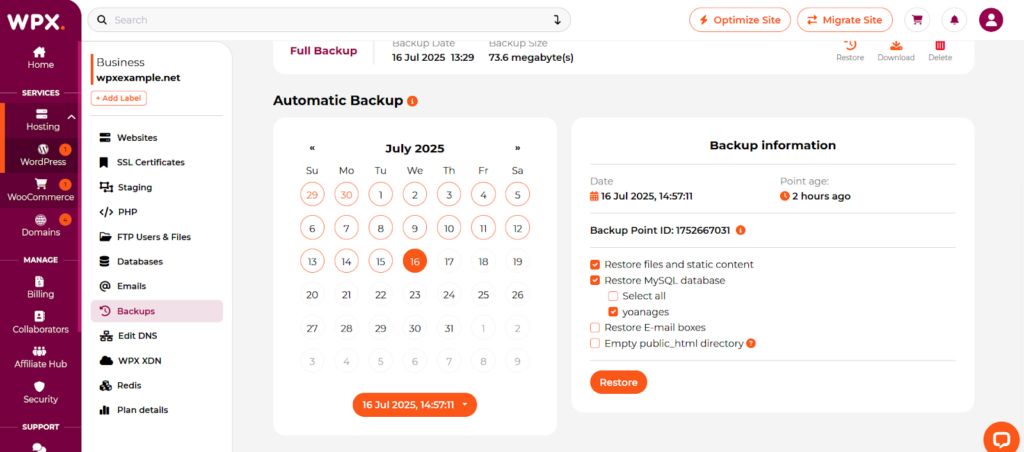
Automatic daily backup feature on WPX Managed WordPress Hosting
Professional Email Hosting:
If you want professional email addresses using your domain name (like yourname@yourblog.com or info@yourblog.com), check whether this is included. If your host doesn’t include it, you will need to use a third-party email service, such as Google Workspace (around $4/month per user).
Free Migration:
This can save you $100-300 and many hours of technical work when you do it yourself. If you’re unhappy with your current hosting service, knowing that WPX will move your site for free and safely makes the switch much easier.
Staging Environments:
These let you test site changes safely before deploying them live. Most managed WordPress hosts include staging sites. For example, if you want to redesign your homepage, you can build and test the new design in staging, show it to your friends for feedback, and only make it live when it’s perfect.
Step 5 – Read Reviews and Test Support
Never choose a host based solely on its marketing promises. Dig deeper into user experiences and test their support yourself before committing.
Check User Reviews:
Read reviews on independent sites like Trustpilot or niche WordPress communities. A few negative reviews are normal for any company, but pay closer attention to consistent complaints about the same issue. Keep in mind to check recent reviews, as hosting quality can change when companies are acquired or when their infrastructure changes.
Contact Support Before You Buy:
- Reach out to the hosting company’s support team before purchasing a plan. Request specific questions like “Do you offer free SSL certificates?” or “What’s your policy on resource limits for shared hosting?” See how quickly they respond and whether their answers are helpful and knowledgeable.
- Check support availability too. Does the host offer 24/7 support, or only business hours in a specific time zone? Managed WordPress hosts typically offer 24/7 expert WordPress support via chat and tickets. In addition, ensure your host supports communication in your preferred channel.
Common Mistakes When Picking a WordPress Hosting Plan
#1 – Choosing the Cheapest Option:
Yes, you can find hosting for $1-2/month, but you often get what you pay for. When your site goes down or gets hacked, you may be on your own with no knowledgeable support to help you fix it. Or you pick a cheaper plan that requires you to purchase essential add-ons separately, such as backups, security, or performance tools.
#2 – Ignoring Renewal Pricing:
Many hosting providers offer very low introductory rates, but prices typically increase considerably after the first year, with renewal costs often much higher.
Check the renewal price before signing up for a hosting plan and calculate what you’ll actually pay over a few years, not just the first year. Sometimes, a host with a higher introductory price but consistent renewal pricing is actually cheaper long-term than one with a dirt-cheap first year but expensive renewals.
WPX, for instance, offers its Starter plan at $14.99 per month when paid yearly (about $179.90 for one year). Over three years, the price drops to $12.49 per month with a prepaid total of $449.75 (plus 11 months free).
At first glance, WPX may appear slightly more expensive than heavily marketed hosts advertising introductory rates of $2.99/month, but those low prices often apply only to the initial term and increase significantly after renewal.
Know what you’re signing up for.
#3 – Using Hosting Service with Poor Uptime:
The industry standard is 99.9% uptime, which means your site should experience no more than about 43 minutes and 49 seconds of downtime each month. If a provider cannot consistently meet this level, your blog may suffer several hours of downtime, leading to lost visitors, missed revenue opportunities, and reduced credibility.
#4 – Paying for Powerful Features You Do Not Yet Need:
When just starting a new blog, some choose a VPS or cloud hosting plan because they think it sounds professional. Start with what your site actually needs – you can always upgrade later as you grow.
#5 – Not Reading the Terms of Service:
This can bite you. What happens if your chosen hosts like automatic renewals that charge your card without warning? Take some time at the initial to understand what you’re agreeing to.
WPX – The Best WordPress Hosting for Professional Bloggers
WPX gives you premium managed WordPress hosting, built for pro bloggers. Start with the Starter plan for one site, unlimited visitors, and plenty of bandwidth. Need more? Upgrade for more sites – perfect for growing businesses and agencies.
WPX isn’t the cheapest, but you get what you pay for. No hidden fees. You get automatic daily backups, malware removal, free migrations, and 24/7 expert support — all included.
Conclusion
Finding the best hosting for WordPress bloggers is one of the most important choices you’ll make when starting or growing your blog. The most suitable option really depends on where you are in your blogging journey and what you need right now. Take your time and choose a hosting plan that supports your goals.
Frequently Asked Questions
Have another question?
WordPress hosting is a specialized web hosting service optimized for WordPress websites, offering improved performance, enhanced security, automatic updates, and WordPress-specific technical support.
WordPress remains the popular choice for blogging in 2026. While it has a steeper learning curve and requires manual updates, the vast ecosystem of plugins (such as Yoast for SEO) and themes enables your blog to scale into a full business or store effortlessly.
A blogging platform such as Medium is an all-in-one service that allows you to sign up and start writing immediately. While it is simple to use, it offers limited control, and you do not own the platform. Blog hosting with WordPress.org refers to the web server space that stores your website’s files and makes your blog accessible on the internet. It serves as the foundation for building and managing your own website, giving you full control over its design, content, and functionality.
If you’re on a budget, self-hosting (WordPress.org) with a provider like WPX is a reliable choice because it gives you control, performance, and support tailored to WordPress.
Earning $1,000 per month is an achievable goal for many bloggers, but it typically takes 12 to 24 months with consistent effort. Most successful bloggers achieve this by leveraging multiple income streams, such as affiliate marketing, display advertising, and selling digital products like online courses.