WooCommerce has been a popular platform for creating online stores for a long time, especially among WordPress users. It’s highly customizable and widely used. However, despite WooCommerce’s strengths, it has limitations. That’s why we will present five WooCommerce alternatives in 2025.
But like WooCommerce, these alternatives have limitations too. They often sacrifice flexibility in exchange for ease of use. Hence, we will present the pros and cons of WooCommerce alternatives for 2025, along with our insights on why WooCommerce remains the best choice for those businesses seeking full control and room to grow.
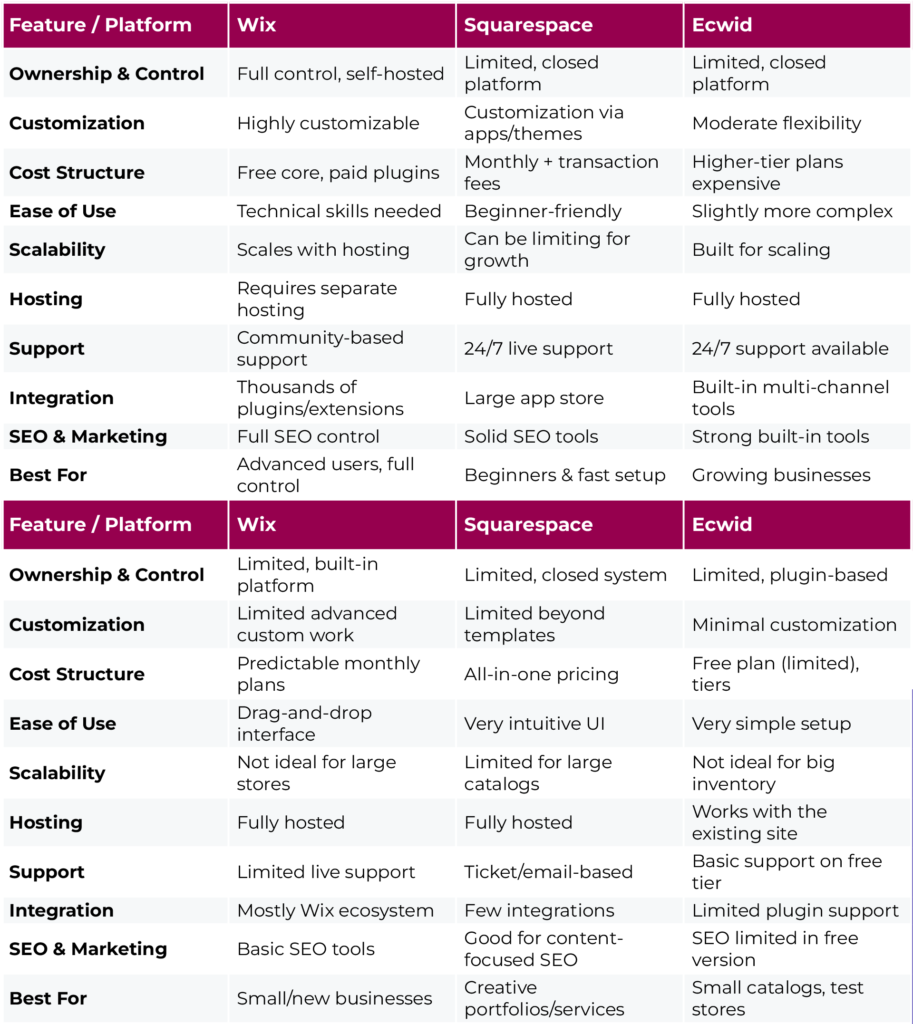
WooCommerce vs Top Alternatives: Feature Comparison
Top 5 WooCommerce Alternatives
Managing an online store requires a customized approach. That’s why we’ve put together a list of the best WooCommerce alternatives, each with its own set of features, strengths, and uses.
These choices have you covered, whether you want a fully hosted platform, something easier to use, or tools made just for your field. Let’s take a closer look at what each one has to offer.
1. Shopify

Source: Shopify
Shopify is one of the most popular e-commerce platforms in the world, and for good reason. WooCommerce remains popular, with a market share of approximately 20.1% worldwide. However, Shopify has taken the lead with about 26.2% of the market share, thanks to how easy it is to use and how well it is managed.
But here’s the deal: you lose some freedom. It can be costly or even impossible to customize beyond what Shopify allows. You have to stay in their ecosystem, and you’ll have to pay monthly fees and extra fees if you use third-party payment gateways.
Bottom line: Shopify is a great way to get started quickly, but WooCommerce is a better long-term investment if you want full control over your store’s features, design, and cost structure.
Pros of Shopify:
- Easy to use and quick to start
- Huge app ecosystem for more features
- Support for customers 24 hours a day, 7 days a week
- Tools for payment processing, inventory, and marketing that come with the software
Cons of Shopify:
- You have to pay a monthly fee
- Extra fees for payment gateways from other companies
- Not as much control as self-hosted solutions
2. BigCommerce

Source: BigCommerce
BigCommerce is another all-in-one platform that lets you run a professional online store without any tech problems. It is very popular with companies that are growing or selling on more than one platform, like Amazon, eBay, or social media.
It has strong built-in tools for SEO, analytics, and inventory management, which makes it a good choice for big or fast-growing businesses.
Still, there isn’t much room for change. You have fewer options for customizing themes than with WooCommerce, and the learning curve is a little steeper than with Shopify. Also, premium plans can cost a lot.
In the end, BigCommerce might be a viable choice for medium-sized businesses that want to grow, but WooCommerce gives you the same (or more) power at a lower cost over time and lets you control your setup completely.
Pros of BigCommerce:
- Tools for marketing, analytics, and SEO that come with the software
- Works with selling on multiple channels right out of the box
- No fees for transactions
- More advanced features for bigger stores
Cons of BigCommerce:
- A little harder to learn than Shopify
- Fewer ways to change the theme
- Higher-tier plans can be expensive
3. Wix for business

Source: Wix
Wix is mostly known as a drag-and-drop website builder, but it has also added simple tools for online sales. It’s very visual, easy for beginners to use, and great for small businesses that want to get online quickly.
Without needing any technical skills, it has all the important features, such as payment gateways, recovering abandoned carts, and optimizing for mobile.
But its flaws become clear rapidly. Wix is too rigid for large or complex stores, and customization options are limited to what’s available within its closed ecosystem.
Wix is a viable option for small businesses or hobby stores, but WooCommerce is a much better choice for serious online stores that want to grow and change.
Pros of Wix:
- A visual editor that is easy to use for beginners
- Many stylish and responsive themes
- Integrations for marketing, chatting, and payments via apps
- Easy-to-understand pricing and all-in-one convenience
Cons of Wix:
- Not much room for complex stores to be flexible
- Not as easy to scale for very large inventories
- Its features aren’t as robust as those of Shopify or BigCommerce.
If you’re interested in knowing more, we prepared a detailed review of Wix vs. WooCommerce.
4. Squarespace Commerce

Source: Squarespace
Squarespace is known for its beautiful design templates and easy-to-use interface. People who work in the arts, provide services, or sell digital goods like it a lot.
It has an all-in-one platform that makes it easy to manage content, marketing, and e-commerce. It also has built-in support for subscriptions, digital products, and memberships.
But its simplicity can be deceiving. Squarespace doesn’t work well with a lot of third-party services, and it doesn’t let you customize things as much as WooCommerce does. It also has trouble with big or complicated product catalogs.
In short, Squarespace might work for you if design is your top priority and you have a simple store. WooCommerce is a better base for long-term control, flexibility, and integrations.
Pros of Squarespace:
- Includes design templates that have won awards
- Tools for blogging, SEO, and marketing are built in
- Good for memberships, digital goods, and services
- Fully hosted and managed
Cons of Squarespace:
- Less integration with other services
- Not as much customization as open-source platforms
- Not great for product catalogs that are very big or complicated
5. Ecwid

Source: Ecwid
Ecwid is a lesser-known option that lets you add storefronts to any website, even if it’s made with WordPress, Wix, or something else. It’s light and perfect for adding online shopping to a small business or side hustle.
You can start for free, and it works with digital goods, subscriptions, and a mobile-friendly design. This is great if you already have a website and want to try out e-commerce without starting over from scratch.
However, achieving growth will be challenging. You can’t change the design very much, and advanced features are only available with paid plans. It also doesn’t work well for businesses that want to grow or have a lot of products.
The bottom line is that Ecwid is a quick and easy way to get started with e-commerce, but if you want to grow, customize, or add a lot of features to your store, WooCommerce is a better choice. Visit our article for a detailed review of Ecwid vs. WooCommerce.
Pros of Ecwid:
- Works well with websites that are already up and running
- Free plan for up to five items
- Allows for digital downloads, subscriptions, and more
- Works in many languages and on mobile devices
Cons of Ecwid:
- Limited options for customizing the design
- The free plan doesn’t have any advanced features
- Not great for stores that are big or growing quickly
How to Choose the Right Alternative
Finding the best platform may seem like a lot of work, but it depends on what you want from your business and how involved you want to be. To begin, ask yourself these important questions:
How comfortable are you with technology?
Shopify or BigCommerce might be the best choice for you if you don’t want to deal with hosting, plugins, or updates.
What kinds of products do you sell?
Are you selling digital goods, subscriptions, physical goods, or services? Some platforms work better with certain types of products. For instance, Squarespace is better for creative and service-based businesses.
How much is your budget?
At first, it seems like WooCommerce is free, but the costs can add up quickly. Prices, however, are more predictable with fixed monthly plans on sites like Ecwid or Wix.
How much customization do you need?
Do you want to be in charge of every little thing, or do you prefer to keep things simple? Choose a solution that comes with themes and tools built in.
Do you need help from customer service?
If you need help right away, look for platforms that have strong, responsive support.
The right e-commerce platform should help you grow, match your skills, and make running your business easier, not harder.
Conclusion
Each of these WooCommerce alternatives has its merits, particularly for users seeking simplicity and low setup friction. However, they almost always come with compromises: limited customization, higher ongoing costs, or a lack of control.
If you’re serious about building a flexible, scalable online business, WooCommerce still offers the most control, the best integration with WordPress, and the lowest long-term cost of ownership.
Choosing the right e-commerce platform is about what works best for you, not what’s most popular. Your goals for your business, your time, and your money all matter. So take a deep breath, think about your choices, and remember that switching platforms is not a setback; it’s a step forward.
Frequently Asked Questions

It depends on what you need. If you would rather not deal with hosting or updates, platforms like Shopify or BigCommerce might be better, as they are easier to use and come with built-in features.
The main WooCommerce plugin is still free. But many important features, such as payment gateways, shipping tools, and design upgrades, often require paid extensions.
Yes, WooCommerce is still a good choice, especially for people who are already familiar with WordPress. But it needs regular care, so it’s not the best choice for everyone.
Yes! You can install WooCommerce for free. Just remember that running a store can still cost money for hosting, themes, and plugins.
No, WooCommerce is a plugin for WordPress. You need a WordPress website to use it; it won’t work on its own.