In the competitive world of e-commerce, staying ahead of SEO trends is essential for maximizing visibility and sales. WooCommerce, as one of the most popular e-commerce platforms, requires a specialized approach to SEO.
As we move into 2024, understanding and implementing the latest SEO strategies is crucial. This comprehensive guide will cover the key trends and best practices to ensure your WooCommerce store ranks high in search engine results pages (SERPs).
Top 5 Tips For WooCommerce SEO
Optimizing your WooCommerce store for search engines is crucial for increasing traffic, improving brand visibility, and boosting sales.
By following effective SEO strategies tailored specifically for WooCommerce, you can ensure that your products rank higher on search engine results pages (SERPs). Here are the top five tips to enhance your WooCommerce SEO:
1. Optimize Product Titles and Descriptions
Product titles and descriptions are essential for WooCommerce SEO as they provide search engines with relevant information about your products. Make sure that your titles are clear and include primary keywords that potential customers might use in their search queries. Similarly, descriptions should be informative, keyword-rich, and engaging, highlighting the key features and benefits of the product.
Example: Fishwife
Fishwife, a brand known for its gourmet canned seafood, uses detailed and descriptive titles and descriptions to engage customers and improve SEO. For instance, their product title “Slow Smoked Mackerel with Chili Flakes” clearly states the main features, making it easier for search engines and customers to understand the product at a glance.
It also includes a frequently googled keyword within their niche. The description further elaborates on the sourcing and smoking process, emphasizing the unique selling points and benefits, which helps in attracting targeted traffic and boosting conversions.
2. Utilize SEO Plugins
SEO plugins can significantly simplify the entire optimization process on your website. They offer features such as automated meta tags, XML sitemaps, and schema markup, which help improve your site’s visibility on search engines.
They also provide insights and recommendations for optimizing individual product pages, categories, and overall site performance.
If you’re a total newbie to the WordPress plugin scene and don’t know where to start looking for the perfect plugin for your online store, check out some of our top picks below!
Our Favorite SEO Plugins for WooCommerce
Yoast SEO
All in One SEO Pack
Known for its user-friendly interface and comprehensive features, Yoast SEO helps optimize your store effectively. It offers tools for optimizing product pages, generating sitemaps, and managing breadcrumbs.
This plugin offers a range of features for optimizing titles, meta tags, and sitemaps. It integrates seamlessly with WooCommerce, providing specific tools for product optimization.
A robust plugin that provides advanced SEO features, including keyword tracking, rich snippets, and automated image SEO. Rank Math is highly recommended for its comprehensive feature set and ease of use.
Offers extensive features like social media integration, custom HTML and XML sitemaps, and more. SEOPress is a powerful tool for optimizing WooCommerce stores and enhancing overall SEO performance.
Of course, just because these plugins work wonders for us, it doesn’t mean that they’ll do the same for you. Fresh plugins get released literally every single day – who’s to say that a brand new plugin or a very niche add-on isn’t the one that will rejuvenate your store and take your sales numbers to the next level?
Ultimately, the best SEO plugin for WooCommerce is the one that you like to work with the most. But how do you go about choosing the right one? Don’t worry – we’ve got you covered. Scroll down to the bottom of this article for a brief guide on choosing SEO plugins that will meet your business needs.
3. Optimize Product Slugs
Product slugs, or the URLs of your product pages, should be short, descriptive, and include relevant keywords. Avoid using default slugs generated by WooCommerce, which can be lengthy and non-descriptive. Customizing your product slugs makes them more readable for users and search engines, thus enhancing your SEO efforts.
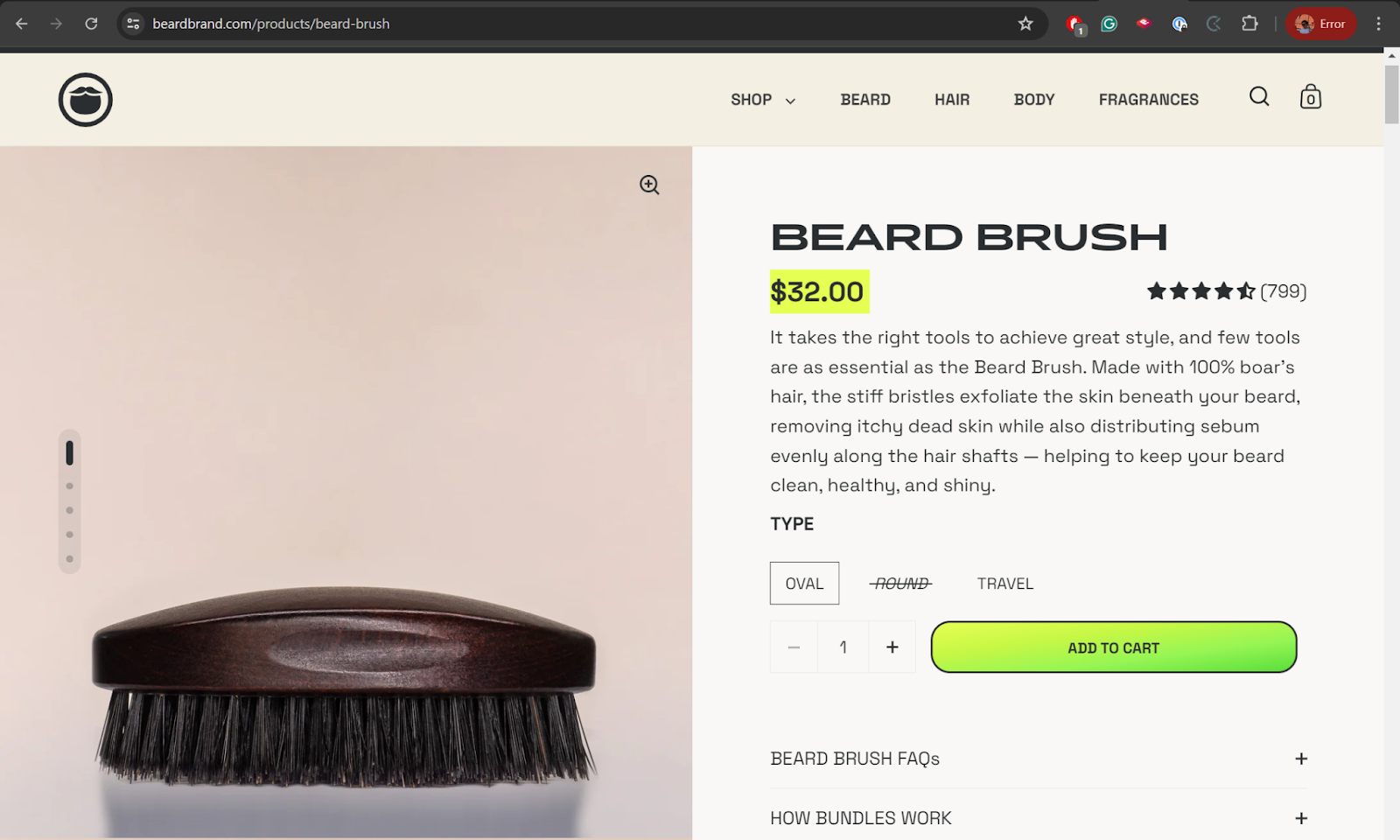
Example: Beardbrand
Beardbrand, a grooming company specializing in beard care products, optimized their product slugs to make URLs more descriptive and SEO-friendly.
Instead of using generic slugs, they use detailed and relevant keywords that precisely match their products, which not only helps in improving search engine rankings but also makes the URL more user-friendly and informative.
This practice ensures that both search engines and customers can easily understand the content of the page just by looking at the URL.
4. Implement Breadcrumb Navigation
Breadcrumbs improve user experience by showing the path to the current page, making navigation easier. They also enhance SEO by providing search engines with a clear structure of your website.
Enabling breadcrumbs in WooCommerce, through plugins like Yoast SEO, can help improve your site’s rankings and make it easier for visitors to find related products.
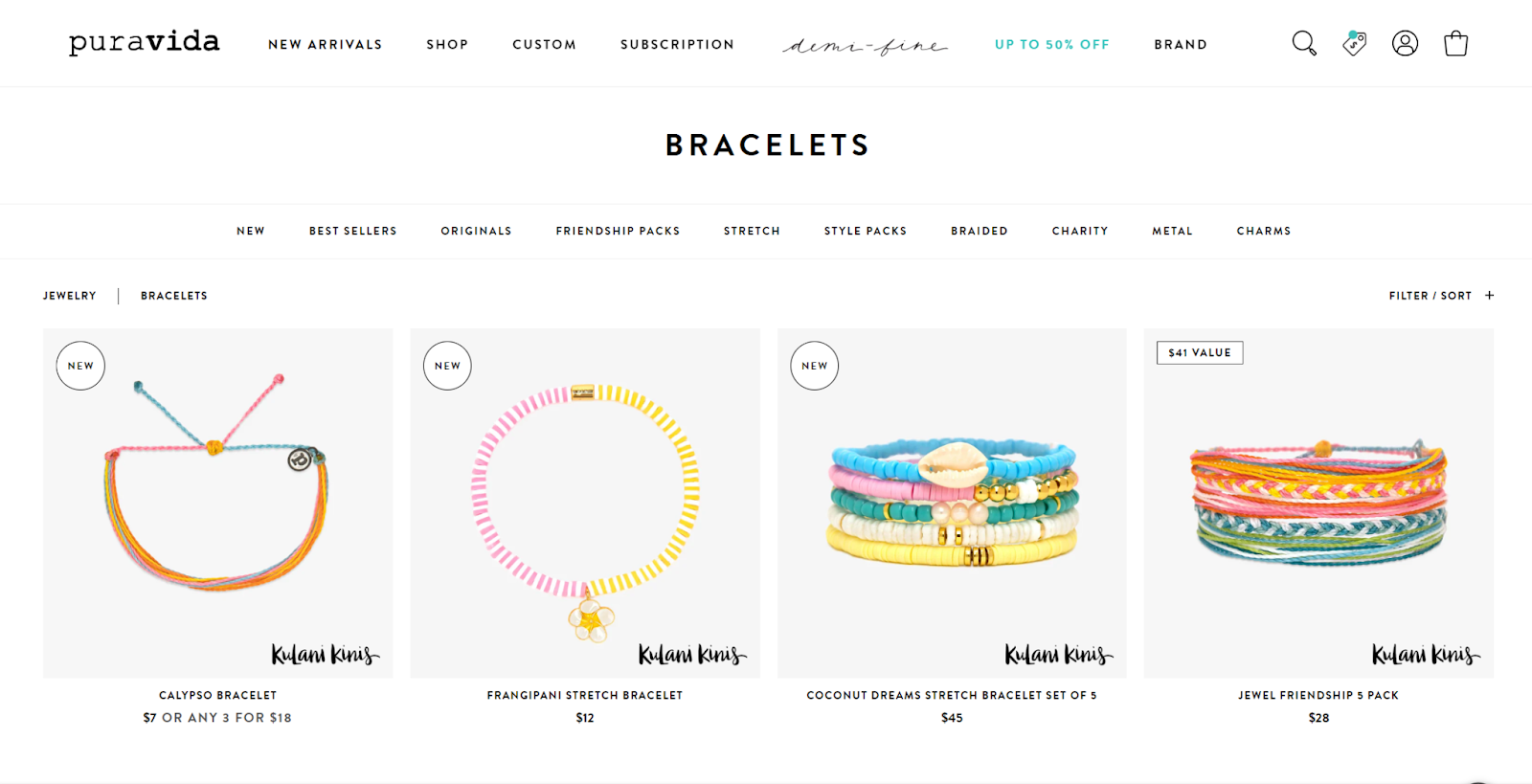
Example: Pura Vida Bracelets
Pura Vida Bracelets, known for their handcrafted jewelry, effectively uses breadcrumb navigation on their website. After migrating to Shopify, they implemented a clear breadcrumb trail on their product pages, enhancing user experience and helping search engines understand the structure of their site.
This navigation feature allows customers to trace their steps back to parent categories, improving site usability and potentially boosting rankings due to better site structure and internal linking.
5. Add Alt Text to Product Images
Alt text for images is a critical factor for image SEO. It provides a textual description of the image, which is useful for search engines and improves accessibility for visually impaired users.
Including relevant keywords in the alt text can help your product images rank higher in image search results, driving more traffic to your store.
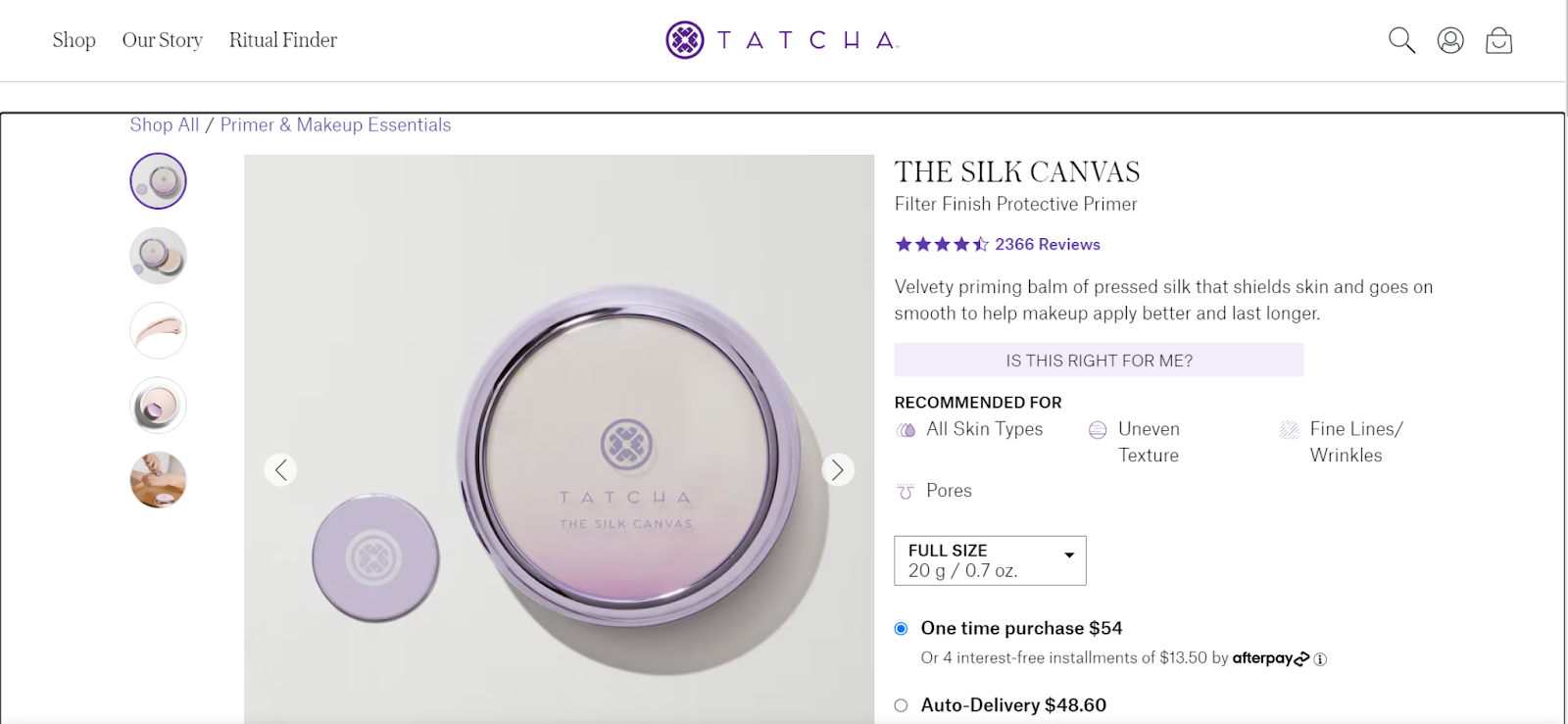
Example: Tatcha
Tatcha, a luxury skincare brand, excels in using alt text for their product images. For instance, an image of their “Silk Canvas Primer” includes the following alt text: “Tatcha Silk Canvas Protective Primer – 20g.”
This detailed alt text not only improves accessibility for visually impaired users but also helps in ranking higher in image search results, driving more organic traffic to their product pages. This practice ensures that the images are easily understood by search engines and improves overall SEO performance.
6. Speed Optimization
Optimizing the speed of your WooCommerce store is crucial for enhancing user experience, improving search engine rankings, and increasing conversion rates. A faster website reduces bounce rates and keeps potential customers engaged. One of the most effective ways to achieve optimal speed is by choosing a reliable hosting service like WPX.
We’re renowned for our exceptional performance. With features like the custom-built WPX Cloud CDN, which delivers content from 37 global endpoints, we’ll make sure that your website loads quickly regardless of the visitor’s location.
All our hosting plans come with free site speed optimization, where our dedicated optimization team performs a thorough audit, including caching plugin setup, CSS/JS minification, image optimization, and database cleanup.
This comprehensive approach significantly enhances your website’s loading speed and performance scores on tools like GTmetrix and Google PageSpeed Insights.
Key SEO Trends for WooCommerce in 2024
As the digital landscape evolves, so do SEO strategies. Keeping up with the latest trends is essential for maintaining your WooCommerce store’s competitiveness. In 2024, several key trends are shaping the future of SEO. These include the rise of voice search, the increasing importance of mobile-first indexing, and the integration of AI and machine learning in SEO practices.
Additionally, Core Web Vitals have become critical for user experience and search rankings. Understanding and leveraging these trends will help you stay ahead of the competition and ensure your WooCommerce store remains visible and accessible to your target audience.
Voice Search Optimization
Voice search continues to grow, with more users relying on voice-activated devices for their searches. To optimize for voice search, focus on natural language keywords and question-based queries. This involves incorporating long-tail keywords and conversational phrases that users might speak into their devices.
Mobile-First Indexing
Google’s shift to mobile-first indexing means that the mobile version of your site is considered the primary version for indexing and ranking.
Make sure your WooCommerce store is mobile-friendly by using responsive design, optimizing load times, and offering a seamless mobile shopping experience.
AI and Machine Learning in SEO
AI tools like Google’s RankBrain are increasingly influential in SEO. These tools help understand user intent and improve search results.
Utilizing AI-driven SEO tools for keyword research, content creation, and analysis can provide a competitive edge. Tools like SEMrush and Ahrefs offer valuable insights into AI-driven SEO strategies.
Core Web Vitals and User Experience (UX)
Core Web Vitals are a set of metrics that measure user experience, focusing on load time, interactivity, and visual stability. Improving these metrics can enhance your site’s SEO performance. Ensure your WooCommerce store meets these standards by optimizing images, reducing server response times, and enhancing interactivity.
SEO-Friendly WooCommerce Themes
One of the easiest, most straightforward ways to get an SEO boost for your online store is to pick out an SEO-friendly website theme on WooCommerce before even launching the website. Here are some of the best themes you might want to try out for yourself.
Astra
Astra is a highly popular theme known for its speed and lightweight design. It offers built-in SEO optimization features like schema markup and AMP compatibility, making sure your store loads quickly and is easily crawled by search engines. Astra’s customization options are extensive, making it suitable for any type of eCommerce site.
Storefront
Developed by Automattic, the team behind WordPress and WooCommerce, Storefront is the official WooCommerce theme. It’s designed for seamless integration with WooCommerce and its extensions. Storefront is highly responsive, built with valid schema markup, and optimized for speed, making it a great choice for SEO-conscious store owners.
OceanWP
OceanWP is a versatile and feature-rich theme that’s fully compatible with WooCommerce. It offers numerous customization options, including advanced coupon management and product badges.
The theme is fully responsive, ensuring a great user experience across all devices. Its lightweight and clean code helps in achieving fast loading times, which is essential for SEO.
Neve
Neve is a modern, mobile-first theme designed for speed and flexibility. It integrates well with WooCommerce and supports drag-and-drop page builders, making customization easy.
Neve’s lightweight structure and fast loading times enhance SEO performance. The theme also includes features like quick product view and custom layouts for product pages, improving the overall shopping experience.
Kadence
Kadence is known for its modern design and user-friendly interface. It offers quick loading times, mobile optimization, and an SEO-friendly structure.
Kadence includes customizable product galleries and extensive integration with WooCommerce, providing a seamless shopping experience. Its intuitive design tools make it easy to adjust layouts, colors, and fonts to match your brand identity.
How to Choose the Best WooCommerce SEO Plugin For Your Business Needs
Your choice of an SEO plugin for WooCommerce can significantly impact your store’s visibility, user experience, and overall sales. Choose the right one, and you’ll see your key metrics go right up. Choose poorly, and you might cause more harm than good to your online store.
With numerous options available, it’s essential to carefully evaluate different plugins and try out a bunch of different options before settling for the one that suits you most.
Here’s a step-by-step guide to help you choose the best SEO plugin for your WooCommerce store:
Identify Your SEO Needs
If you’re new to the world of SEO, even something as simple as determining what exactly you need a plugin to do for you can be quite difficult.
The ultimate goal is to rank better on search engine results pages, but how exactly can you go about it? Look out for these key features in your WordPress plugins.
Keyword Research: Determine if the plugin offers tools for keyword research to help you target the right search terms.
On-Page SEO: Look for features that assist in optimizing product titles, descriptions, and meta tags.
Technical SEO: Check if the plugin can handle technical aspects like XML sitemaps, schema markup, and canonical URLs.
Content Analysis: Some plugins offer content analysis and recommendations to improve your SEO strategy.
Social Media Integration: If you leverage social media for marketing, choose a plugin that supports social sharing optimization.
Analytics and Reporting: Opt for plugins that provide comprehensive SEO performance reports and analytics.
Evaluate Plugin Usability
When assessing potential plugins, consider the following points:
Ease of Use: The plugin should have an intuitive interface and straightforward setup process. A user-friendly dashboard can save you time and effort.
Customization Options: Look for plugins that allow you to customize SEO settings for different products, categories, and pages.
Compatibility: Ensure the plugin is compatible with your current WordPress theme and other installed plugins to avoid conflicts.
Support and Updates: Check if the plugin is regularly updated and offers reliable customer support. Active support forums and documentation can be valuable resources.
The Bottom Line
Staying ahead of SEO trends and practices is vital for the success of your WooCommerce store. By implementing the strategies discussed in this article, you can improve your store’s visibility, drive more traffic, and increase sales in 2024 and beyond.
Keep experimenting, stay updated with the latest trends, and continuously optimize your WooCommerce store to achieve the best results.
By Georgi Todorov founder of ThriveMyWay, a place for online entrepreneurs, bloggers, SEO specialists, and freelancers to find success in their own way. Being on the first page of Google is vital for website traffic. Three out of every four searchers will never look past the first page on a search engine. Therefore, ranking on the first page through excellent SEO practices is just as important today as it has ever been. The problem is that Google does a small algorithm change at least once a day. Keeping up with these changes is challenging even for the best SEO experts. So, it is more realistic and vital that you focus on the essential SEO tactics for your business. Therefore, we asked industry experts for their SEO tips and collected them here for you.
Pete
Pete is the founder of OutreachPete.com, a blogger outreach agency that helps agencies get coverage and links from relevant publications in their clients’ niches. Never repeat a non-branded anchor text more than once Managing your anchor text can have a huge influence on your rankings (both good and bad), which is why so many SEOs spend a lot of time carefully trying to include their keywords when building links. However, repeating keyword-based anchor text, even if it’s a partial match can send a red flag to Google that it is being manipulated or controlled. Therefore, it is best practice to carefully track your anchor text usage and search against previous links before you place any link that isn’t a brand name or URL-based anchor. You can still include the same keywords but never have an exact duplicate of a previously used anchor text that includes your target keyword. Mix the order around, include new supporting words, and always vary the phrasing. This is the best way to continue to add value to your links without creating an easy-to-spot footprint.
Jayson DeMers
Jayson DeMers is the founder & CEO of EmailAnalytics, an app that visualizes email team activity to help optimize productivity. Publish research reports. You can do this in a few ways:
Use your own primary data
Aggregate external data into one unifying report
Survey your customers or email list
However you do it, creating research reports that provide unique, interesting, valuable insights is the best way to get links, traffic, eyeballs, and build a new audience. And all of that boosts your SEO results. Then, promote your research report. Here are a few ways to do that:
Publish a press release
Announce it to your email list
Share it on social media
Get other people to share it on social media
Promote it on your website (such as through a link, pop-up, or slide-in)
Consistently release new research reports that provide value and insight, and you’ll earn inbound links and traffic, which will boost your SEO results in 2022 and beyond.
Miles Anthony Smith
Miles Anthony Smith, a tech keynote speaker, SEO consultant, and founder of Why Stuff Sucks®, delights in delivering invaluable content to people hungry for answers to their most vexing questions or challenges. Create new content (for sure), but don’t miss opportunities to optimize existing pages for “striking distance” keywords. To use a boxing metaphor, you need to be within “striking distance” to outpunch your competition. If any of your pages are ranking on the 2nd half of page 1 (positions 4-10) or on page 2 or 3 of Google (and I’m almost certain you have many of these pages since most of my clients have these when I start consulting with them), you are leaving money on the table. When you identify 1 single keyword phrase per page where you are close to more SEO traffic, in perfect striking distance, it’s time to land an SEO “one-two punch.” The jab: You need to inject only that 1, but very important, keyword phrase in “striking distance” into 5 fields for that existing page:
Meta title
Meta description
H1
Body copy below H1
Url slug
The cross: Use high-authority internal pages (must be relevant) to link to your newly optimized pages and boost their authority. These two powerful boxing punches will dramatically increase your odds of a quick boost to your SEO rankings for those pages. Once you publish the changes, you will typically see a bump in rankings and traffic within 2-3 months.
Nick Malekos
Nick Malekos is the SEO Manager in LearnWorlds, focusing on quality content that converts into revenue. He is a well-rounded Digital Marketer with a focus on eLearning and education markets. A rising trend we see in how Google ranks keywords is based on Topic Clusters. A website or an article is ranked for multiple related keywords based on a web of correlations it recognizes between the words and the topics covered or linked to by the website. We expect this to be hugely important in 2022, and SEOs who will take advantage of it will see their rankings grow. How to act on Topic Clusters?
Redesign your website around major topic clusters –> Breadcrumbs, menu, blog categories, category pages, etc
Map out the topic, with various keywords around it. Write articles with multiple keywords in mind.
Write multiple blogs/pages on the topic linking them internally (it’s similar to the skyscraper technique, but having multiple keywords as the focus)
Paul Granger
Paul Granger – Digital Marketeer at Website Promoter UK, a site that provides online marketing services and free advice on how to grow your reach and traffic online with better ROI using SEO and Pay-per-click. SEO Competitor Analysis When you know who your competitors are and what they offer, you can set your prices and strategies competitively. Besides, you can find out whether the new businesses that enter your market and the current competitors hold any threat. Knowing this will help you to be realistic about how your business will fare. There are two main competitor categories that you should focus on. The first category is direct competitors. They are brands in your sector who market similar products and services like yours. Indirect competitors are those who solve the same customer pain points as you but in a different way.
Tom Riley
Tom Riley – Lead Gen Specialist and Head of SEO for UK-based financial advisor site Joslin Rhodes. Climb the Authority Ladder When trying to rank for new topics, you can build authority in your niche by targeting low competition search terms. ‘People also ask’ is a great way to find Q-A style content where you directly answer people’s questions in a post. Interlink your Q and A posts together and insert a contextual anchor up to the main page you are trying to rank to pass some authority. For example – If you want to rank for ‘Retirement Planning Advice’, then when not, write content around low competition search terms relevant to your niche, such as ‘how much do I need to retire at 55’. This will allow you to bring relevant traffic to your site, which gives Google more reason to trust your domain. As you begin to become more topically relevant, you can slowly start to progress and write content for more competitive search terms.
Apostolis Lianos
Apostolis Lianos is a Growth Marketer at ON.marketing & a full-time SEO geek. He has bold experience in growing retail, eCommerce & SaaS companies and in the past has been in the shoes of a (failed) startup founder, twice. In his spare time, he enjoys ristrettos, weiss beer, chess, gaming, sports & traveling. Never skip SERPs analysis. Right after you define your focus/target keyword based on the findings of your keyword research, the very next step should be checking who’s ranking at Google’s top positions for that keyword. However, the most important of all is to understand how they do it. This process provides you with valuable data about how the top results achieved these rankings and then by tracking their content strategy (headings, URL backlinks, LSI keywords used, word count, etc), you can confidently know what you have to do to outrank them. Best Part? You can also get it done even with free SEO tools as long as they provide SERPs data.
Cristina Moraru
Cristina Moraru is the Digital Marketing Strategist at Media Training. She’s got almost 5 years of experience in marketing and has been working with various startups in Denmark and the US. In her spare time, she enjoys going to the theater, a nice hot chocolate in the cold weather, traveling, and swimming. Leverage Your Local SEO There are billions of people searching for local information or products/services that are nearby. Google My Business can help companies become more visible and focus on what people are really searching for. The nearest drug store, petrol station, or vegan-friendly coffee shop: once you concentrate on the right keywords and optimize your pages for Google search, you’ll have higher chances to reach potential customers. There are a few benefits of Google My Business that you should be aware of. For example, It allows people to leave reviews that show what people are really thinking about your business, which gives more confidence to the new buyers. Another benefit is that GMB provides insights on whether your information is correct and trustworthy. Finally, it’s free and easy to use. You don’t have to spend millions on updating your profile as long as you’ve got the designated person to monitor the performance.
Nick Jordan
Nick Jordan is the founder of Workello.com. He’s taken 4 brands from 0 to 100,000 organics/month with the largest growing from 0 to 1.5m organics/month (and a $210m series B valuation) in less than two years. If you look at the biggest SEO outcomes on the internet, they all have one thing in common. Yes, their DR is high, but more importantly, they all have a lot of content. I analyzed some of the most high-profile brands crushing SEO, and they have an incredibly huge moat of content.
# of Pages Published Per Month to Catch Up in 12 / 24 / 26 / 48 months
Kinsta, you would need to publish 267 pages every month for a year
NerdWallet, you would need to publish 472 pages every month for three years
The Points Guy, you would have to publish 625 pages every month, for four years
Viktor Ilijev
Viktor is the owner of content production house bbdirector.com, helping websites publish 100 + top 10 SERP LHF ranking articles per month. He also runs viktori. co where he helps individuals and companies pitch deals and fundraise by crafting their pitches.
Build an in-depth topical cluster covering all variations of a particular topic – become the ONLY source of information that Google needs to serve queries on a specific topic.
Increase E.A.T. by having real authors contribute articles to your site. Google wants information that is written by real people. More importantly, people with the right experience and background to back up the content on your site.
Think 2 steps ahead and create custom internal images that people can link to. Forget deposit photos – Use Canva and create easily shareable internal images that people will link to. These images can simply be a summary of a specific paragraph OR a list of headings paired up with your site branding and an illustration.
Publish as much as possible as fast as possible. First come first served, particularly if you see a niche that is still young.
Qhubekani Nyathi
Qhubekani Nyathi aka The Click Guy, founder of Wholesome Commerce, is a pillar content strategist for SaaS, Marketing, and e-Commerce brands. He helps B2B brands drive ROI through actionable pillar posts that drive traffic and build authority. He’s been featured on top sites like Search Engine Watch, Get Response, Crazy Egg, and ClickZ. Build Organic Links Fast Through Statistics Posts “Every SEO knows getting links is an arduous task. It involves several time-consuming steps like finding target sites, searching for contact info, crafting a personalized outreach email, following up, social media exchanges, and more. But there’s a painless way of getting links: statistics posts. By writing a blog post about vital statistics in your industry, you can get people to link to your website organically. Content creators need research numbers to back up their views. So if you produce a timely stats resource, they’ll gladly link to it in droves. One such post I wrote generated over 200 backlinks naturally.
Zero outreach. Zero paid promotion. Zero social media DMs. For the strategy to work, make sure your stats are:
Fresh: use the latest numbers, not dated ones.
Credible: reference trustworthy sources, not unreliable ones.
Startling: showcase astounding figures, not the usual ones.
Try the stats resource link-building strategy today. The results might surprise you!”
Saravanan P
My name is Saravanan and I have 7+ years of experience in Digital Marketing. Currently, I work as a Senior Digital Marketer at Animaker taking care of organic marketing for our latest product Vmaker which is a screen recorder and video creation tool. Connect with me on LinkedIn. Optimize content for user intent As an SEO Analyst, I am passionate about learning new things every day in SEO. A page can rank for many keywords, not because they cover a certain topic, but because they address many user intents or many variations. Today, I am going to give you one SEO tip that helps to optimize your existing web page content for user intent and also, gain more organic traffic to your website. For that, you need a Google Search Console. Follow the steps given below to optimize your existing page or blog. Step 1: Go to Google Search Console and click on the Search results. Step 2: Set a Date range to last 3 months and click on the New to Add a Page filter.
Step 3: Add a page URL that you want to optimize into the filter and click Apply. Step 4: Export Data as Google Sheet Step 5: Open that Google Sheet and Apply the filter for the “Impression” column as greater than 100 and for the “Position” column as Between 4 to 30.
Now you have the list of keywords that users search to visit your site or the keywords that your website is getting organic impressions from. With this data, you can optimize your content by adding these keywords into content or adding content related to these keywords which helps to improve the ranking for the keywords that are currently ranking between 4 to 20 and convert this impression into clicks. Also, satisfying the user intent. I hope this helps.
Dario Zadro
Dario Zadro has 20+ years of experience as a full-stack web developer and is the owner of Zadro Web, where they provide custom web development, technical SEO, and fully managed web hosting and cloud solutions. Build a proper SEO foundation! My SEO tip is to ensure your SEO foundation is built correctly before starting other SEO strategies. Like building a house, a poor foundation would be disastrous. Most people want to go straight to generating content and building links. And yes, those tasks are essential, but the foundation is vital. Some questions to consider:
Is your tracking correctly set up to monitor event behavior?
Is your UX tested and optimized?
What is your plan to build brand authority?
If you’re a local business, are your GMB and other citations consistent with NAP?
Did you triple-check your XML sitemap, robots.txt, and other crawling directives?
Don’t get me wrong, authoritative and relevant links are excellent, and stellar content is a must. But, it’s the SEO foundation that will set up your website for long-term success!
Chris Labbate
Chris Labbate is the Owner of SEOBANK, a Digital Marketing Agency in Canada. With over 15 years of Search experience, we help companies become more profitable via data-driven marketing and specialize in Entity SEO and advanced schema markup. Want to Cut Your Link Building Budgets in Half? We all know relevant links move the needle, but do we have a solid process to acquire them at scale? We have been killing it in the SERPs lately with getting more niche-relevant links. Here is how… Start by Googling the main keyword you want to rank for, export the list of domains with an extension like MozBar or the SEO Toolbar by Ahrefs. ProTip: (you can easily use the same method with your competitor links as well!) You will need an Ahrefs account to export the backlinks for the top 10 domains you exported from Google. Now we are going to apply some filters to get the list down to a manageable number, using the best metric to dial in what we need:
Dofollow
One link per domain
DR 25 and higher
Domain traffic 200
Backlinktype filter: in content
This list on its own can be gold, but we are going to run it over to my new favorite tool for SEO in 2022. On-Page Ai is really marketed as, well… as the name suggests an on-page tool.
However, within the tool we see this feature “Link Relevancy Tool” and without going too far into the technology, it uses “Google NLP Categories” to quickly filter out any irrelevant links, and keep the best link opportunities using category relevance (direct from Google).
The tool filters link both on the domain level and the page level for topical relevance. You can quickly see your best opportunities and only pitch the links that matter, hence drastically reducing wasted time and link budgets.
Nikola Roza
SEO for the Poor and DeterminedMy one SEO tip that always works is to work with Google, not fight against it. Namely, out of a given set of pages on your site, most will rank decently, some will rank poorly, and some incredibly well. The third group is the ones that simply soar and are on the second page of Google with you barely doing any SEO. Google loves you for those topics so you need to focus on them. Here are the steps.
Find those key pages using GSC;
Do perfect on-page SEO- everything you can to make your page hyper-optimized and relevant;
Send as many contextual internal links as you can;
Once the dust settles and your rank improves, calculate how many backlinks you need to build and start building those.
This method works every time and produces fast rankings as you’re working with Google, not against it.
Sam Browne
Sam Browne is a serial entrepreneur with a portfolio of successful 6 & 7 figure sites. His secret sauce is combining SEO, Copywriting, and UX to supercharge conversions and achieve #1 Google rankings. Expert Response Link Building Sites like helpareporter.com, Terkel.io, and Qwoted offer marketers a simple yet powerful way to contribute expert opinions and experience to some of the largest websites in the world. These contributions are then quoted in blog posts, with a dofollow link back to the contributors’ website. This is called Expert Response link building. Through HARO, our agency has built links for our clients on sites including shopify.com, realtor.com, cloudways.com, parents.com, home.com, bhg.com, and many more. These sites have millions of monthly unique visitors and extremely high domain authority. Business owners can contribute responses themselves, or work with agencies such as HARO SEO to outsource their responses. Typically, it takes around 20 responses to build a single link, but the quality of the links is second to none. We are regularly placing links for our clients on DR70, DR80, and DR90 websites. Expert Response link building is by far the easiest way to build top-notch, completely safe links to your site in 2022.
Nicholas Rubright
Nick Rubright is the founder of Ranko Media, an SEO-driven content marketing agency based in Tampa, Florida. New Reach Marketing helps their clients’ websites grow to millions in monthly organic traffic with epic blog content. Internal Links Internal links are hyperlinks from one page to another on the same domain. Optimizing your internal links is an essential part of a successful SEO campaign in 2022. Why internal links are important: Google uses internal links to help discover new content. Linking from an indexed page to a brand new, non-indexed page directs Google to index your new page quickly, and start showing it in the SERPs. Without internal links, Google can’t see the page and it remains undiscovered. Pages with no internal links are called orphans. Internal links also assist with the flow of PageRank around your site (And yes, PageRank is still a thing in 2022. Source: Ahrefs.com). For the most part, the more internal links a page receives, the higher its PageRank. With that said, both quality and quantity play a part in a page’s PageRank. Internal links also aid the flow of PageRank around your site. That’s a big deal. Generally speaking, the more internal links a page has, the higher its PageRank. However, it’s not all about quantity; the quality of the link also plays a vital role. Here are some best practice tips for easily optimizing your internal links:
Use Keyword-Rich Anchor Text
Link from heavily linked pages (home, top-performing content, etc) to pages you want to rank
Don’t Use The Same Anchor Text For Two Different Pages (it confuses Google)
Put Links High Up On Your Page
Use dofollow links (hopefully, this is obvious, but still)
Erin Neumann
Erin Neumann is the CEO of Be Aligned, a Veteran and Woman-Owned SEO Agency located in St Louis, MO. Focus on Core Web Vitals Google launched Core Web Vitals in June 2021. Core Web Vitals measures your website’s UX by focusing on 3 main factors:
Largest contentful paint
First input delay
Cumulative layout shift.
These three intimidating sounding titles can be simply summed up:
Above the Fold Page Load Speed (Largest contentful paint)
User Ability to Interact with Your Site (First Input Delay)
Visual Stability as Pages Load (Cumulative Layout Shift)
Here’s what each one actually means in practice: Above the Fold Page Load Speed (Largest Contentful Paint) Core Web Vitals does not focus on page speed, but on the user’s perceived loading speed. Specifically, LCP focuses on the time it takes for the largest element above the fold (imagery seen without scrolling) to load. You can check your LCP score using Google PageSpeed Insights, but I recommend checking it in GSC (Google Search Console). Search Console will let you know how your LCP is doing for your entire site, rather than just page by page. User Ability to Interact with Your Site (First Input Delay) FID measures the time it takes for a user to interact with your page. Examples of interactions include:
Clicking a menu option
Clicking a button
Opening a menu on mobile
Visual Stability as Pages Load (Cumulative Layout Shift) Cumulative Layout Shift (CLS) is the stability of a page as it is loading. Put another way, if the elements on your page are jumping all over the place as the page loads, you have a high CLS. Your goal is to get your CLS as low as possible.
Steve Pogson
Steve is the founder of First Pier, an SEO and digital marketing agency focused on e-commerce businesses based in Portland, OR. Recreate Blog Posts as Videos It’s a no-brainer to convert your blog posts into videos and offer the same content in two different formats. Here’s why:
In 2022, 33% of all online activity is spent watching videos.
Marketers who use video grow revenue 49% faster than non-video users.
45% of the US watches 60+ minutes of video on Facebook or YouTube per week
Videos on social media generate 1200%(!) more shares than text and images combined
Video drives a 157% increase in organic traffic from Google
Videos on landing pages typically increase conversions by 80% or more.
In short, you will pick up a ton of additional organic traffic by repurposing content you already created. Some things to keep in mind when turning a blog post into a video: Choose the Right Blog Post Not every blog post makes a great video. We recommend avoiding turning any company news into video content unless that news is fun and entertaining. Instructional/how-to blog posts make great videos. This is the type of content that will perform best in video format. Do a “read it aloud” check While using the text from the blog post as your script generally works, we recommend reading it aloud first to identify any sections that would benefit from being simplified or removed altogether. We recommend using short, simple words, and breaking a long sentence down into 2-3 simple sentences. Use a mic to capture professional sounding audio While a modern laptop typically has a built-in mic, the quality is not intended for video voiceovers. We would recommend either investing in a simple mic setup, or outsourcing the reading of your revised blog post content to a voiceover actor on voices.com.
Ben Walker
Ben Walker is a CEO, entrepreneur, and visionary leader that enjoys helping others become successful in business and in life. Ben’s company Transcription Outsourcing provides user-friendly and cost-effective transcription services for the medical, legal, law enforcement, and financial industries for organizations all over the world. Ben is a sought-after thought leader and has made contributions to publications like Entrepreneur Magazine, Inc, Forbes, and the Associated Press. Follow Ben’s Tweets: @benjaminkwalker Google’s new, as of the summer of 2021, Core Web Vitals are making a huge impact on sites that don’t meet their requirements. You will need to make sure you have the fastest and best web hosting company you can afford. You need a fast site on both mobile and desktop or you will be penalized by Google’s new speed requirements and lose traffic. Losing traffic means you will lose money. Having a fast site may involve utilizing a CDN (content delivery network), so make sure you ask about that when you are shopping around web hosting companies. If they don’t provide a CDN ask them who they partner with that can provide that and make sure you test it before you commit to it. Think about it when you are going to new sites yourself. Do you like waiting for a new site you’ve never been to take a long-time loading? Exactly, don’t be cheap and go with the lowest-priced web hosting company, instead, go with the fastest, I promise you will not regret it.
Henry Cazalet
Henry Cazalet is co-founder and director of The SMS Works. The SMS Works provides a low-cost and reliable SMS API for developers. He helps companies of all sizes make the most of SMS marketing as well as reduce their costs. Henry’s a two-time entrepreneur and has over 19 years of experience in mobile marketing.
Make the news, don’t comment on it.
We’re all familiar with how tough it is to generate inbound links to our website and content. It’s a never-ending task of pitching and mainly rejection. A major part of the problem is that our stories are just not that compelling and there’s a good chance that others will be pitching the same or similar content. What’s needed is impact. Something unique that no one else has access to. So my tip is to find a controversial topic in your industry and investigate it. Come up with research that challenges the current thinking. Provide evidence and back it up with industry quotes. What is the one subject that no one is prepared to engage with because it’s the elephant in the room? Poke at the problem and expose it. Write up a detailed report on your website with charts, quotes, and images. Then pitch that story to industry news editors, inviting them to link back to the full story on your website. Using this approach, we’ve gained some links with some very powerful sites that have given our link building a massive boost.
Michael Dinich
Michael Dinich is a personal finance expert, podcaster, YouTuber, and journalist. Michael is the founder of Your Money Geek, a rapidly growing personal finance and pop culture website. Use Syndications to Boost Your SEO Syndicating your content is a great way to help you boost your SEO rankings and build backlinks to your site. Content syndication is one of the secrets behind NerdWallets amazing SEO strategy and is why they are beating competitors like SoFi and The Motley Fool. Offering you content for syndication content helps you build great backlinks to your posts, while simultaneously extending your website’s reach. I’ve had many articles explode because of syndications and received links from sites I would never have been able to get links from otherwise. One fear with syndication is that even with the canonical link a syndicated version of your post might outrank your own. However, you don’t have to syndicate your top posts, and you can create new content specifically intended for syndication that links back to your best work.
Irina Weber
Irina Weber is a freelance writer and content strategist at SE Ranking. The importance of Author Pages Google confirmed the importance to prepare for Author Pages and implement their schema markup for rating your website. Good Author Pages allow you to boost your Author Reputation as a significant part of the Google search algorithm that affects your SEO. Quality author and expert pages include bio information, articles, and links leading to other websites. When you link to author pages, you can help these authors improve their expertise in a particular niche. Notice that author pages don’t affect your website rankings, but can increase trust and loyalty with your readers.
Dileep Thekkethil
Dileep Thekkethil, a Journalism Postgraduate, was formerly with a US-based online magazine, is the Associate Director, Digital Content at Stan Ventures. He is a frequent blogger who keeps a tab on the latest updates in SEO and technology arena. Give more emphasis on authority and expertise signals. The internet has a swarm of information. What makes your content unique is the additional value that you provide along with the information that’s already there. When you strive towards achieving this every single time, your website will automatically earn Google’s trust signals, and ranking for even the hardest keyword will become easy.
Takeaway
You would expect that 22 experts would have given a vastly diverse range of SEO tips for you to implement. However, their tips fit into three key areas to help your website rank high. You need to focus on the content, linking, and user experience. By focusing your efforts in these areas using the tips above, you can take your website to the first page of search results. The thing to remember is that you’ve got to prove to Google that you are an authority in your niche. If you can prove it to Google, then you have the chance to prove it to more online users and potential customers.