If you run a small business, work solo, or are building a startup, choosing the right hosting service is critical to your business. The hosting you choose directly affects whether customers wait for your pages to load or trust your site enough to make a purchase or book your services.
The problem is, most hosting companies throw a lot of technical jargon at you. You’re suddenly faced with questions like: How many CPU cores do I actually need? What’s the difference between shared and managed hosting?
If that sounds familiar, you’re not alone.
This post lets you know what matters when choosing hosting for your business. You’ll discover the essential features that set a top web hosting for small businesses apart.
7 Reasons Why a Good Hosting Service for small business is Critical
But before we get into the specific features, let’s look at why hosting is so important for any business. Here are the main reasons to invest in quality hosting:
Keeps Your Website Online and Accessible
If visitors can’t access your website, nothing else you’ve built – your products, content, or marketing – can do its job.
Hosting uptime is the percentage of time your site is available without interruption. Top web hosting for small businesses typically guarantee 99.9% uptime (the industry standard). Even though no host can truly promise 100%, the goal is always to minimize downtime as much as possible.
Downtime can occur for many reasons, including server failures, maintenance, cyberattacks, overload, or unexpected technical issues. Regardless of the cause, the impact is the same: lost traffic, lost sales, and damaged credibility.
Online users often expect instant access. If your website is frequently unavailable, customers won’t wait around. A few minutes of downtime can result in substantial revenue loss. And while some hosting companies offer small credits or refunds as compensation, they rarely cover the actual cost.
Reliable hosting providers reduce these risks through redundant infrastructure, with backup systems automatically taking over if a component fails. They also use monitoring tools to detect problems early and prevent outages before they affect users.
If your website is constantly going down, it’s a sign your hosting provider isn’t delivering the reliability your business needs.
Improves Website Speed
A good hosting service plays a major role in how fast your website performs. While design elements like images and code matter, the hosting environment is what determines how efficiently your site’s data is processed and delivered behind the scenes.
Website speed refers to how quickly a browser can load and display a fully functional webpage. Here’s how hosting directly impacts speed and performance:
- Storage Hardware: High-quality hosting providers use SSD or NVMe storage, allowing data to be retrieved quickly and reducing load times instantly.
- Server Resources: Site speed depends heavily on available CPU and RAM. Shared hosting often slows down when too many sites compete for the same resources, while VPS or dedicated hosting ensures consistent performance.
- Server Locations: The physical distance between a visitor and the server affects loading speed. Better hosts offer globally distributed data centers or CDN support, so users can access your site from the nearest location.
- Optimized Software Stack: High-end hosting providers run faster server software like LiteSpeed or NGINX and keep systems updated with the latest PHP versions, improving how efficiently pages are generated.
- Server-Side Caching: Instead of rebuilding pages from scratch every time, premium hosting uses advanced caching solutions that store ready-to-load versions of your content, delivering pages almost instantly.
How can I test the speed of my website?
Builds Customer Trust and Credibility
Your website is often the first impression customers have of your business, and a secure, reliable site instantly communicates professionalism. When visitors see that your site is available, loads properly, and protects their information, they are far more likely to trust your brand.
Nothing damages credibility faster than running into errors like “Site Not Found” or browser warnings such as “Connection Not Private.” These issues make users question whether your business is legitimate or safe – and in most cases, they won’t stick around to find out. Instead, they’ll move on to a competitor with a smoother, more secure experience.
Improves SEO Performance
Content that is more accessible and user-friendly may perform better in Search. Core Web Vitals are one of the signals used in Google ranking systems, and Google encourages site owners to aim for strong Core Web Vitals scores to support both Search success and a better overall user experience.
One of the biggest ways hosting affects SEO is through site speed, especially Google’s Core Web Vitals. Hosting impacts this immediately because server response time determines how fast pages begin rendering, even before any front-end optimizations take effect. A slow server can degrade metrics such as Largest Contentful Paint (LCP).
In addition, when Google encounters frequent timeouts, downtime, or unstable servers, it may reduce how often it crawls your website. Fewer crawls mean your new pages or updates take longer to be indexed, lowering visibility and traffic potential.
Viral content or seasonal sales can overwhelm low-resource servers, causing slowdowns and server errors, such as 503 Service Unavailable. High-quality hosts, along with scalable solutions such as seamless plan upgrades, help ensure your site can handle growth without sacrificing performance.
Protects Your Business From Cyber Threats
A good hosting provider keeps your business safe by including several layers of security that run continuously in the background.
For example, firewalls and web application security monitor incoming traffic and stop suspicious requests before they reach your site. Malware scanning routinely checks your files and databases for harmful code, hidden backdoors, or infections, helping you avoid serious damage.
Supports Business Growth
Scalable hosting allows easy upgrades for traffic spikes without migration hassles. It scales with increased bandwidth and resources as your audience grows, preventing crashes during promotions or viral moments.
Saves Time With Responsive Support
One of the underrated reasons a good hosting service is critical is its customer support. If your site crashes at midnight, what happens if you can only submit a ticket and have to wait 2 days for an email reply? Every minute of downtime can lead to lost sales and frustrated visitors, especially for e-commerce businesses.
Top web hosting for small businesses typically offer responsive 24/7 support via live chat, phone, or fast ticketing systems, enabling issues to be resolved in minutes or even seconds. Their support teams are trained technicians who understand issues like WordPress errors, server misconfigurations, security concerns, and performance optimization.
What Makes a Good Hosting Service for Small Businesses?
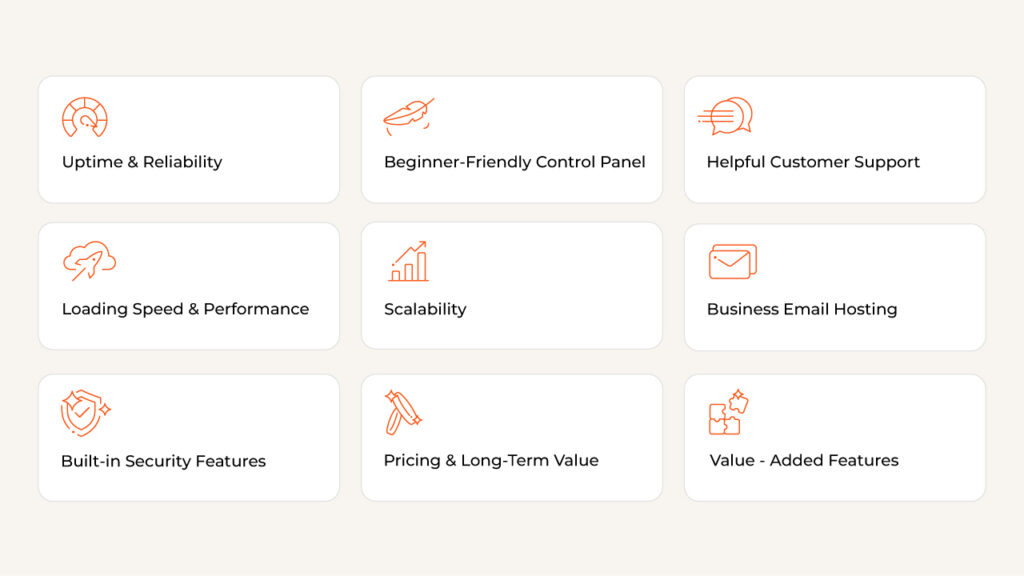
Below are the essential characteristics that define a truly good hosting service for small businesses:
Uptime and Reliability
For businesses of any size, website uptime directly impacts revenue, reputation, and customer trust. Prioritizing providers built for high availability, especially those using cloud or redundant server setups to keep your site accessible during unexpected failures, is critical for growth and long-term success.
Several primary factors that influence your web hosting uptime:
- Data center environment: High-quality facilities use backup power systems, such as UPS units and generators, to prevent outages during electrical failures. They also maintain advanced cooling systems, since overheating can force servers to shut down automatically.
- Hardware quality: Servers are still physical machines, and parts wear down over time. Reliable hosts replace aging components before they fail and use modern storage such as SSDs or NVMe drives, which are not only faster than traditional hard drives but also more reliable because they have no moving parts.
- Network connectivity: A website can only stay “up” if users can reach it through the internet. Dedicated hosting providers maintain multiple ISP connections so traffic can reroute automatically if one network path fails. They also include built-in DDoS protection to stop malicious traffic floods from knocking your site offline.
- Software management and human oversight: Hosting providers must apply security patches and updates regularly to prevent crashes and vulnerabilities. On cheaper shared hosting plans, other sites consuming too many resources can also drag your performance down or cause outages. Misconfigured DNS settings or server errors can make a site unreachable even if the hardware is still running.
- Maintenance: Instead of taking servers offline for routine updates, professional hosting companies shift workloads seamlessly so customers never experience interruptions.
Loading Speed and Performance Features
One of the most important factors is the type of storage your host uses. Modern hosting providers use SSD or NVMe storage, which delivers dramatically faster read and write speeds. This results in quicker page loads, smoother browsing, and a more responsive experience for customers.
Another major performance booster is CDN support. A Content Delivery Network stores copies of your website’s files across multiple data centers worldwide. Instead of every visitor accessing your site from one central server, the CDN delivers content from the location closest to them.
For example, someone visiting from London can load your site from a nearby European server rather than a U.S.-based one, reducing latency and improving speed.
Built-In Security Features
The total number of malware attacks worldwide surged to 6.06 billion in 2023. With so many attacks targeting websites each year, choosing a hosting provider with strong security measures is one of the most important steps in protecting your business online.
A top web hosting for small businesses typically includes:
- Advanced Firewalls (WAFs): Web application firewalls monitor incoming traffic in real time, filtering out harmful requests like bots, SQL injection attempts, and cross-site scripting exploits before they reach your website.
- DDoS Protection: Distributed Denial-of-Service (DDoS) attacks can overwhelm servers with massive waves of fake traffic. Premium hosts use traffic filtering, rate limiting, and global mitigation networks to absorb these attacks and maintain uptime.
- Malware Scanning and Detection: Constant malware monitoring helps identify suspicious files, injected code, or vulnerabilities in plugins and software. Many providers can automatically quarantine threats or offer quick cleanup tools.
- Automatic Backups and Easy Recovery: If something goes wrong – whether it’s a hack, a failed update, or human error — automatic daily or real-time backups allow you to restore your site with just a click. This ensures minimal downtime and prevents major data loss.
Scalability for Future Growth
Repeatedly switching hosts is time-consuming and can lead to unnecessary downtime. A good hosting provider offers built-in scalability, allowing you to increase resources as your traffic and customer base expand. During high-demand periods, such as Black Friday, you should be able to upgrade your plan quickly without complex migrations.
Another important feature is resource monitoring. A quality host provides a clear dashboard showing how much of your server capacity you’re using. This helps you spot when you’re approaching your limits so you can scale proactively.
Beginner-Friendly Control Panel
As a small business owner, your focus should not be on managing complicated server settings. That’s why a good hosting service must include a control panel that’s simple and intuitive.
High-quality hosting providers follow what is often called the “one-click rule.” Tasks like installing WordPress, creating a professional email address, or restoring a backup should take just a single click.
A beginner-friendly hosting dashboard makes website management easy, even if you have zero coding experience. Top web hosting for small businesses offer tools such as cPanel or modern custom control panels that provide drag-and-drop simplicity for managing domains and DNS settings, email accounts, website files and databases, security features, and backups.
Instead of forcing you to learn server architecture, a user-friendly control panel allows you to run your website smoothly with minimal effort.
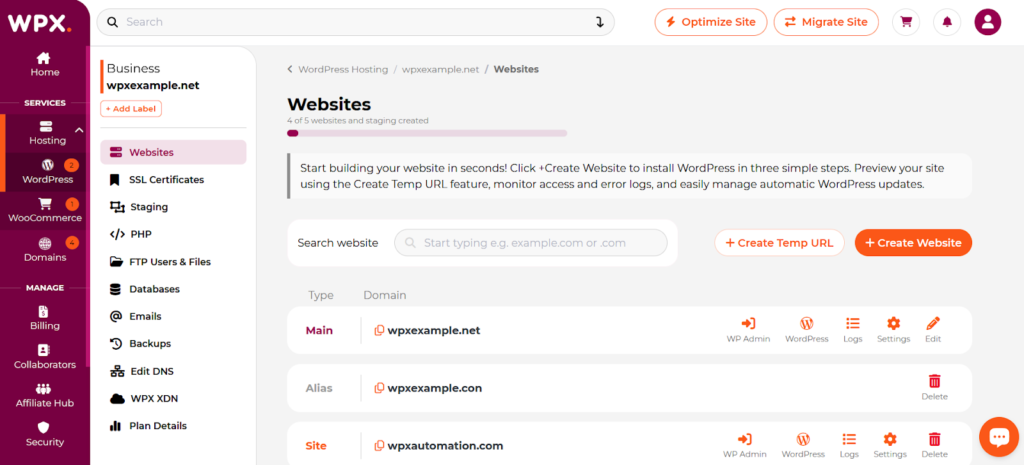
WPX Control Panel: WordPress Hosting
Pricing and Long-Term Value
Reliable hosting at reasonable prices is often a priority for new businesses. Hosting costs can vary widely depending on the type of server resources, features, and level of management included. The hosting plan you pick is one of the biggest factors in your overall website cost.
A key consideration is predictable long-term cost. Many providers advertise very low introductory rates, such as around $2/month, that increase significantly to $15/month or more once the initial contract ends. A trustworthy, top web hosting for small businesses will be clear and upfront about these renewal increases.
Additionally, hosting plans that include essentials such as a free domain, backups, and security features can save money over time and prevent additional add-on charges.
Helpful Customer Support
A good hosting provider offers 24/7 assistance. Whether it’s through live chat or phone, you should be able to reach someone immediately when an urgent issue happens.
Equally important is the quality of the support team. High-quality hosting companies employ knowledgeable technicians who can troubleshoot problems instead of giving you unhelpful answers like “it’s a coding issue.” Reliable support will help you identify the problem, explain what is happening, and show you how to fix it.
Business Email Hosting Included
Using a generic address like @gmail.com or @yahoo.com can make a business appear less established, even if your services are excellent.
Hosting companies often include business email hosting, allowing you to create branded addresses like sales@yourbusiness.com or support@yourdomain.com. This instantly strengthens trust and makes your communication look more legitimate when sending quotes, invoices, or customer replies.
Many hosting plans even offer multiple or unlimited @yourdomain.com email accounts that sync easily with tools like Gmail.
Value-Added Features
Extra features can save you time and reduce startup costs:
- Free domain for the first year is a common perk many companies offer, which can reduce initial expenses by around $10–$15, especially helpful for new businesses.
- One-click WordPress installation allows you to launch a professional website in as little as a minute – no technical background required.
- WooCommerce pre-configurations are built-in ecommerce support that is useful for businesses planning to sell online. These setups often come ready with SSL support and payment integrations, making it easier to start an online store quickly and securely.
- Automated backups (daily or on-demand) safeguard your site data and enable quick recovery from issues such as accidental errors or technical failures, often included at no extra charge.
How to Choose the Right Web Hosting Provider for Your Small Business
Many small business owners don’t have a technical background, and that’s completely normal. You didn’t start your business to become an IT expert. But when choosing hosting companies, it’s easy to feel overwhelmed and unsure of what really matters for your site, and to end up making the wrong choice and wrong plan.
Keep reading, and you will have a simple, beginner-friendly way to choose the right hosting provider for your small business.
Start With Essential Hosting Features
Before committing to any hosting plan, don’t worry about complicated technical details. Instead, focus on a few basic features required for a professional, reliable online presence.
Consider hosting that clearly offers:
- Easy-to-use control panel
- Strong uptime and fast performance (99.9% uptime guarantee, SSD or NVMe storage, CDN support)
- Security (free SSL certificates, malware scanning, firewalls, automatic backups)
- Responsive customer support
- Upgrade options for future growth, so you can easily scale resources such as bandwidth, RAM, and CPU power as your traffic increases. A host that supports seamless upgrades ensures you won’t need to switch providers every time your business hits a new milestone.
Compare Value
Entry-level options, such as shared or basic WordPress hosting, typically start at about $2 per month, while more advanced solutions, such as cloud or dedicated hosting, can cost hundreds of dollars per month. The hosting model you choose determines how much CPU, RAM, bandwidth, and technical support your website receives.
When selecting a hosting service, the key is to understand what you’re actually paying for. Several factors influence hosting pricing for small businesses:
- Website platform: Sites built on open-source CMS platforms like WordPress give you more freedom to choose hosting providers, while proprietary website builders often bundle hosting into higher-priced plans. In those cases, you’re paying not only for server space but also for the builder software itself.
- Type of hosting: Shared hosting is the most affordable option, but it offers limited resources because many websites share the same server. VPS hosting offers more consistent performance through allocated resource limits, while cloud hosting provides flexibility by distributing traffic across multiple servers. Dedicated hosting is the most expensive option, providing a business with full control over an entire server.
- Whether the plan is managed or unmanaged: Managed hosting includes additional support services such as automatic updates, backups, database optimization, and malware cleanup. While it costs more, it can be a good choice for small businesses without an in-house IT staff.
- Plan features: Factors such as bandwidth limits, allowed websites, database caps, server response times, and built-in security tools can all affect value. Some providers advertise low rates but charge extra for essentials like backups, malware protection, or email hosting.
- Contract terms and renewal pricing: Many hosts offer attractive introductory rates that increase significantly after the first term. A trustworthy provider is upfront about renewal costs and doesn’t hide important details in fine print. In addition, paying upfront for a longer contract (such as one or three years) can lower the monthly cost, similar to locking in a better rate with a long-term lease.
- Customer support quality: Support is another major factor that affects value. Plans that include multiple support options, such as live chat, phone assistance, and well-trained staff, may cost more upfront, but they can save you significant time and money when unexpected downtime or technical issues occur.
- Bundled value: For example, free SSL certificates, domains, and automated backups, so you aren’t constantly paying for add-ons.
Evaluate Performance and Reliability
Key performance metrics: During a trial period or money-back window, test the metrics that matter most for user experience and search visibility:
- Time to First Byte (TTFB): Shows how quickly the server responds when someone requests your site. Consistently high TTFB is often a warning sign of overloaded infrastructure.
- Largest Contentful Paint (LCP): How quickly the main content of a page becomes visible.
- Interaction to Next Paint (INP): Tracks how responsive your site is when users click buttons or navigate menus.
99.9% uptime guarantee: No provider can guarantee 100% uptime; choose reliable hosts that are designed to minimize outages. When assessing reliability, look for clear indicators of operational confidence:
- Clear Service Level Agreements (SLAs)
- Public Status Transparency (Your providers should publish real-time incident reports and historical uptime data through a public status page.)
- Managed Updates and Maintenance
If you’re not a technical person, and can feel confused and unhelpful when you look at technical documentation, below are:
How to test website speed very quickly and easily
Use the free tool – Google PageSpeed Insights.
- Go to Google PageSpeed Insights
- Paste your website URL
- Look at only two things:
- Mobile Performance Score: If above 85, very good; if above 70, acceptable
- Largest Contentful Paint (LCP): If it’s under 2.5 seconds, it’s commonly a good loading speed
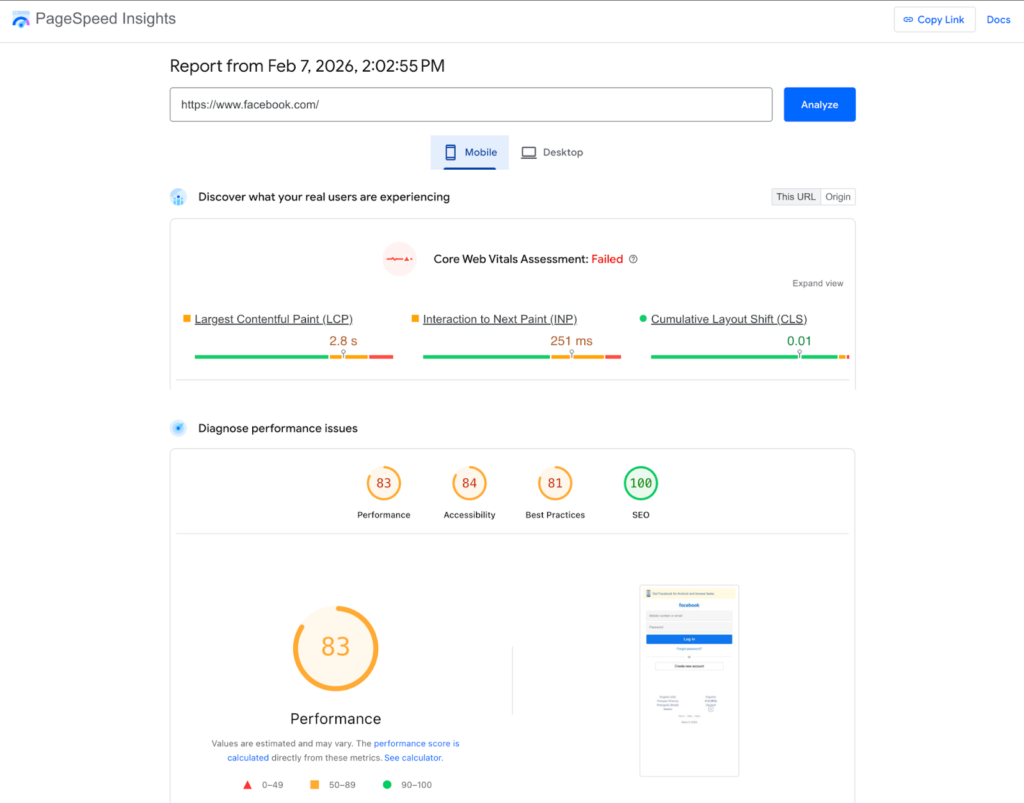
Google PageSpeed Insight
How to check uptime with no technical knowledge at all:
Use Uptime Robot.
- Sign up for free
- Add your website link
- It will email you if your site goes down
After 7–14 days:
- If uptime stays near 99.9% → good
- If it keeps going down → avoid that host
How to identify a “high-performance” host quickly:
Look for these keywords in their hosting plan:
- SSD or NVMe storage
- Free CDN
- LiteSpeed or Nginx servers
You should also review what resource limits apply to your specific plan, so you don’t get surprised as your business grows.
Look for Support and Ease of Use
The best hosting companies typically offer:
- Responsive customer support via live chat or phone
- Helpful knowledge bases and tutorials, allowing you to solve common issues or learn basic tasks on your own.
- Beginner-friendly dashboards to manage domains, install WordPress, set up email accounts, and monitor your site without needing coding skills.
Make Security a Top Priority
Security is one of the most important factors when choosing a hosting provider. The key is not to simply trust marketing promises. Verify that a hosting provider’s security features are active and easy to use.
Review the provider’s official documentation and knowledge base. A top web hosting provider for small businesses will clearly list protections such as free SSL certificates, firewalls and WAFs, DDoS mitigation, malware scanning, and automatic backups. If these features are difficult to find or vaguely described, that’s usually a warning sign.
For example, if they say “backup available” but not “automatic,” an additional cost may apply.
WPX Hosting: The Top Web Hosting for Small Businesses
When it comes to managed WordPress hosting, WPX Hosting stands out as an ideal solution for small business websites. The Starter plan provides everything a new business needs to establish a strong online presence:
- SSD storage
- Unlimited visitors
- Global CDN
- Free SSL certificates
- Daily backups
- Malware protection
- 24/7 expert support
- 5 months free with a 2-year plan
As your business expands, the Business plan accommodates up to 5 websites with doubled resources, while the Professional plan caters to scaling freelancers and small agencies.
All plans include a one-click WordPress installation, brute-force protection, super-fast SSD storage, malware scans and free removal, the “Fixed For You” guarantee, and hybrid DDoS protection.
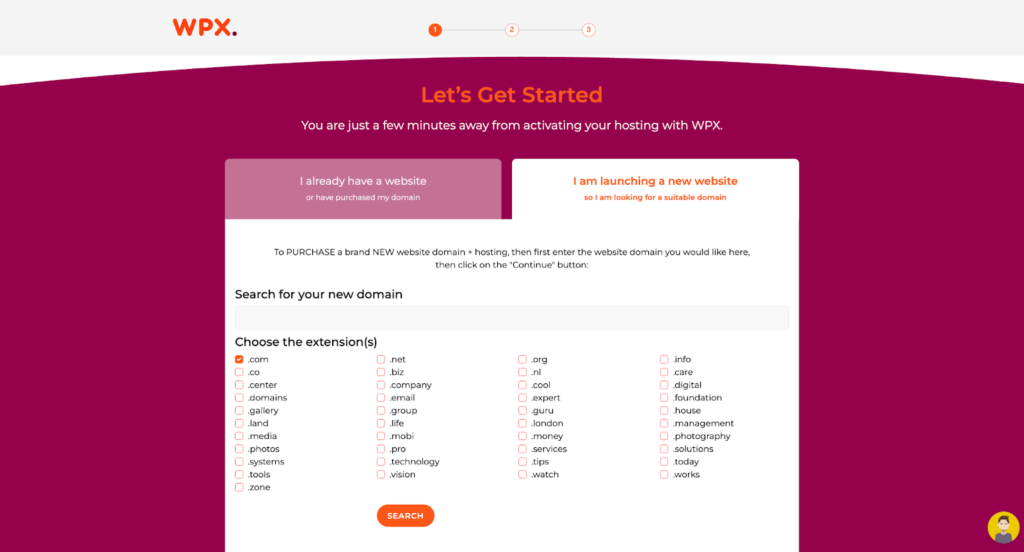
Multi-year plans include up to 20 months of free service for meaningful long-term savings. Plus, with expert support available 24/7 via live chat, you’ll never feel alone when technical questions come up.
Conclusion
The ideal small business hosting service should be invisible when everything’s running smoothly, but be there immediately when you need assistance. It should grow with your business without forcing you into complicated migrations. Most importantly, the top web hosting for small businesses should deliver fast, secure, and reliable performance at a price that fits your budget.
Frequently Asked Questions
Have another question?
Small businesses rely on a combination of core tools to operate effectively, including accounting software, reliable website hosting, email and collaboration management, customer management platforms, and payment processing.
Managed WordPress hosting is often the best option for most beginners in 2026. It functions as a full-service solution for non-tech entrepreneurs with automated security and expert support. If you have a very tight budget, shared hosting is still a good choice, but you will need to handle more website maintenance. For a WordPress site, managed hosting helps keep it fast, secure, and stress-free.
Among the top options for small businesses, WPX.net stands out as a reliable provider for growing websites and WordPress businesses. WPX is well known for its ultra-fast servers, built-in security protections, and responsive 24/7 expert assistance.
Security is the primary concern, as free hosting providers don’t often provide firewalls or malware scanning. Furthermore, performance is degraded by overcrowded servers, resulting in slow load times and frequent crashes.
Hosting comes with several potential drawbacks worth considering. Security vulnerabilities mean that if your provider’s server is breached, your data and customer trust are compromised. There is also a technical dependency risk — if the host experiences a server outage or hardware failure, your business goes offline instantly with no way for you to fix it. Additionally, resource limitations on cheaper plans can cause site crashes during traffic spikes. For all these reasons, choosing a high-quality hosting provider is essential.