Tag: shopify

  • How to Migrate from Shopify to WooCommerce

    How to Migrate from Shopify to WooCommerce

    Making the switch from Shopify to WooCommerce? You’re not alone—it’s a popular move for online shop owners who want more flexibility, control, and, yep, even a little extra cash in their pockets. WooCommerce, the open-source superstar of WordPress plugins, gives you near-endless options to customize your store’s look, feel, and features. It’s perfect for businesses ready to grow and stand out!

    But let’s be real: migrating from Shopify to WooCommerce takes a bit of planning to make sure things go smoothly. We want you to keep all your data safe and your SEO rankings intact—no one wants to mess that up!

    In this guide, we’ll cover everything you need for the big move. From prepping your data to setting up WooCommerce and styling your shiny new store, we’ve got all the tips and tricks to help you glide through the process like a pro (or at least look like one!). So buckle up, and let’s get you ready for the WooCommerce world!

    Why you should consider moving your site from Shopify to WooCommerce?
    Let’s start with some of the main potential benefits:

    • Enhanced Flexibility and Customization:  WooCommerce offers a higher degree of flexibility and customization compared to Shopify. This means that you can tailor your online store more precisely to your unique requirements and provide a truly personalized experience for your customers. 
    • Easily Back Up Your Store with WooCommerce: Unlike WooCommerce, Shopify does not offer a built-in backup solution, which can be a drawback for businesses relying on secure data management. WooCommerce, as a self-hosted platform, allows users to create regular backups of their entire site, giving them full control over data recovery in case of accidental deletions or technical issues. In contrast, Shopify’s hosted environment lacks a native backup option, requiring users to rely on third-party apps to ensure data protection and restore capabilities.
    • Total Ownership and Control: With WooCommerce, you gain complete ownership and control over your website. This level of control is especially valuable for businesses that want to have a hands-on approach to their online presence.
    • Integration with WordPress Ecosystem:  WooCommerce seamlessly integrates with the WordPress ecosystem. This provides you access to a vast array of plugins and themes that can enhance the functionality and appearance of your online store. It allows for a more tailored and comprehensive approach to meeting your specific business needs.
    • Content Marketing Synergy: If content marketing plays a crucial role in your strategy, WooCommerce, being part of the WordPress platform, allows for a seamless integration of content and commerce. WordPress is renowned for its blogging capabilities, and combining this strength with your e-commerce site can result in a more integrated and effective marketing strategy.
    • Scalability for Future Growth:  WooCommerce is known for its scalability. As your business grows, WooCommerce can easily adapt to increased demands and provide a scalable solution for expanding your online presence.

    Now that you’re familiar with the benefits of using WooCommerce, let’s guide you through the migration process.

    Back up your Shopify store

    When migrating from Shopify to WooCommerce, creating a backup of your Shopify store is a crucial first step to ensure data security. Shopify does not offer a built-in backup option, so it’s important to manually export your store data, including products, customer details, and orders. Use Shopify’s export features to download CSV files of each data type and, for extra security, consider using a third-party app for automated backups. This backup will serve as a safeguard, allowing you to restore your Shopify store data in case of any migration issues, ensuring a smoother transition to WooCommerce.

    How to Еxport Shopify Data?

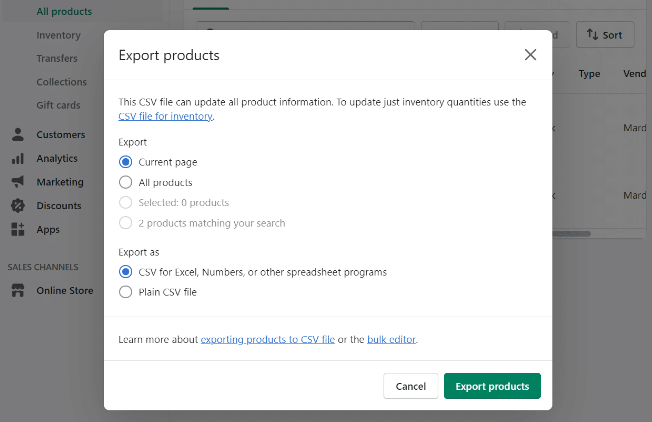
    To migrate your products from Shopify to WooCommerce, start by exporting your Shopify product data. In your Shopify admin dashboard, go to Products, then select Export. Choose to export All Products to a CSV file format, as this file will contain essential product details like titles, descriptions, prices, and inventory information: 

    how to export shopify data
    Make sure to select the appropriate CSV format for your needs, as WooCommerce accepts both Shopify’s default CSV or a custom file format. This CSV file will be key for importing your products into WooCommerce, simplifying the transfer, and helping to maintain data accuracy.
    Set Up WordPress and WooCommerce

    To begin the migration from Shopify to WooCommerce, you’ll need to secure reliable hosting, such as WPX, to ensure optimal performance and support. We also recommend trying out our WooCommerce hosting plans, designed specifically to meet the needs of growing e-commerce businesses and make the transition smooth and efficient. Here at WPX Hosting, we have a fully automated process for installing WordPress. 

    Once you have WordPress installed on your site you need to install WooCommerce. To do so, go to Plugins > Add New and type “WooCommerce” in the search bar at the top of the screen. Once you see the WooCommerce plugin just click on the “Install Now” button:
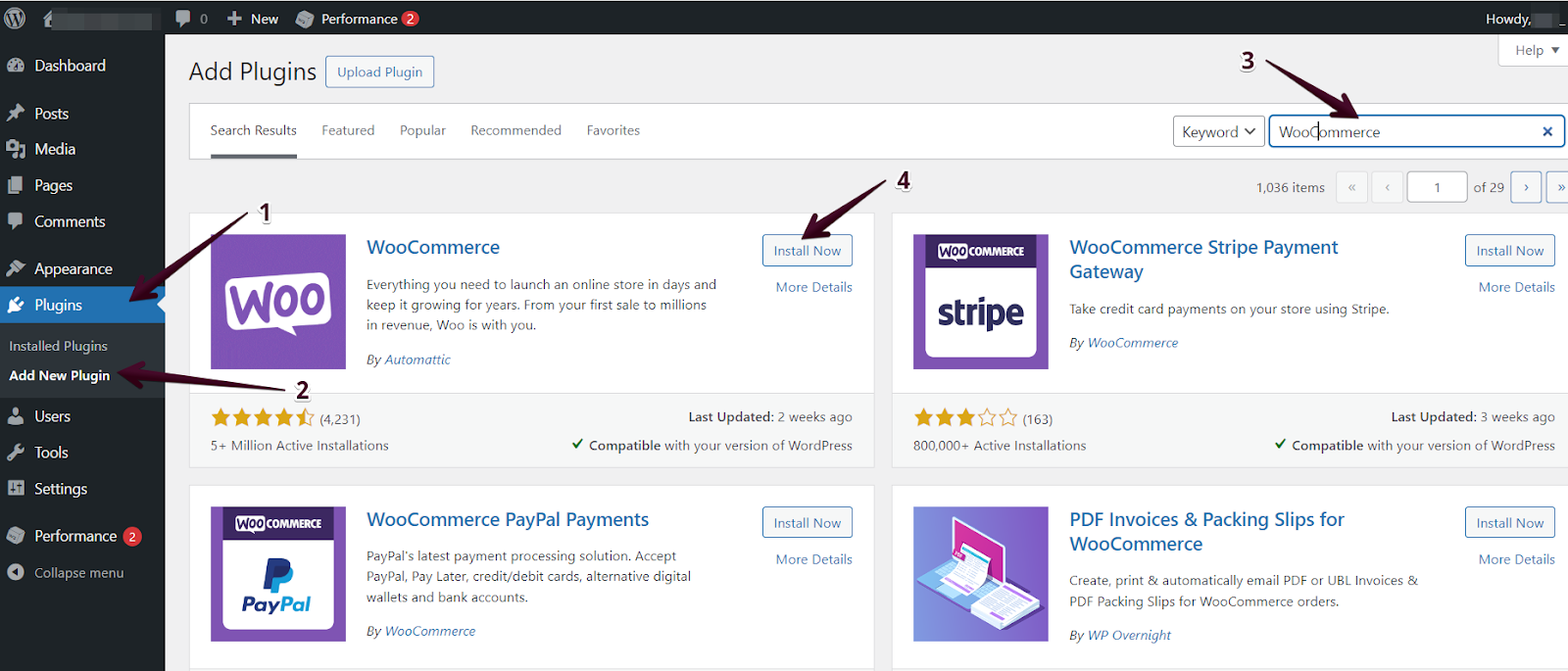
    This process of downloading and installing the WooCommerce plugin will happen in the background, so don’t leave the page until the “Activate:” button appears next to WooCommerce:

    Once it does, click on it and that’s it! Now WooCommerce is up and ready to go. That means you can start publishing and selling products. 

    But first, let’s see how to export the products from Shopify.

    How to import Data into WooCommerce?

    There are two ways that you can import Shopify products into WooCommerce. One method is to use the built-in product importer that WooCommerce has, and the other is through a migration service.

    In this article, we’ll check the first method using the WooCommerce Product Importer. It’s very important to know that if you select this method you’re only importing products. All of your store’s data, such as customers, order history, images, and reviews, will remain in Shopify. 

    In essence, you’re starting over using WooCommerce with your existing inventory and a blank store slate.

    However, if this is not a dealbreaker for you let’s check how to import that CSV file from the previous step.

    First, you need to select Tools then Import settings, and choose WooCommerce products (CSV) Run the Importer button:
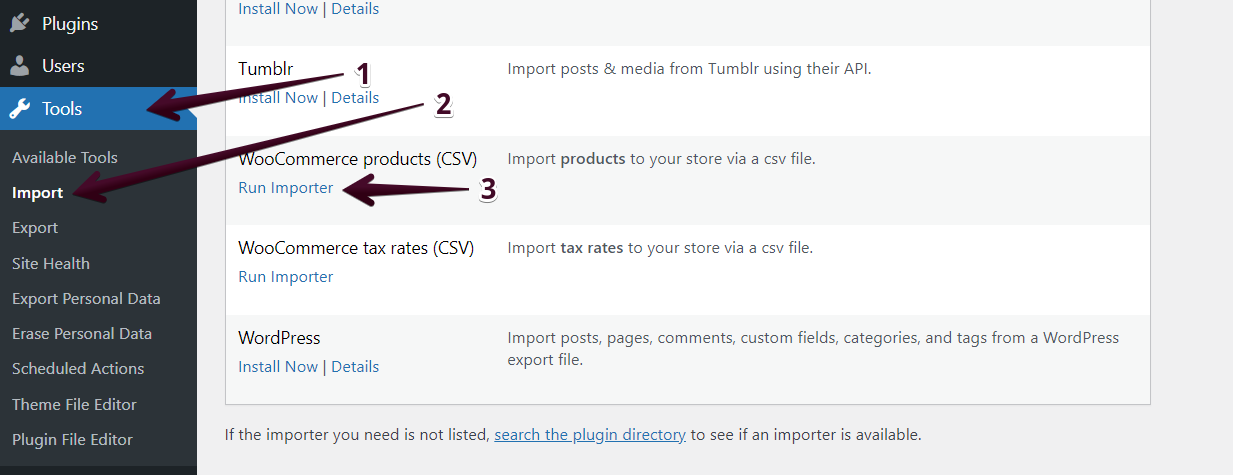
    On the next page, WooCommerce will ask you to choose the file you want to import. There’s also an option for updating existing products using the data from a CSV file. You can leave that box unchecked.

    Then you need to press the Choose File button, select the CSV file, and click on Continue.

    The next screen includes a couple of options for matching product data from the CSV file to WooCommerce fields:
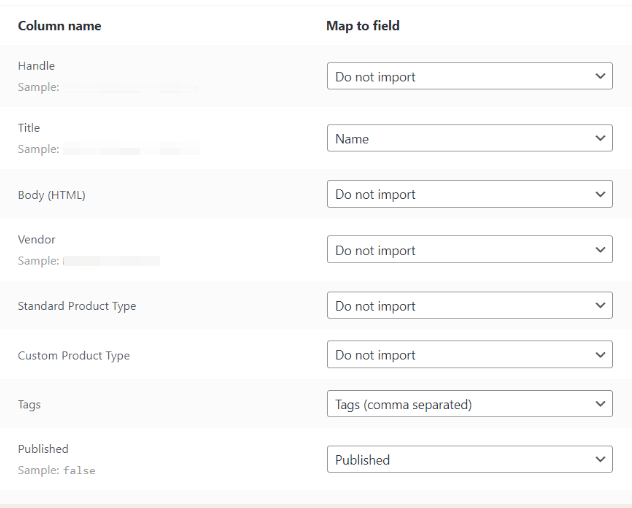
    Once you’re happy with your choices, click on Run the Importer. WooCommerce will take a minute (or more) to import your Shopify product data. When the process is over, you’ll see a success message.

    Please remember that WooCommerce won’t import product images, so you must upload those manually. It’s highly recommended to check out each item entry to ensure it’s not missing any critical information.

    If product data is missing, you can always rerun the importer and make sure you’re porting the correct fields to WooCommerce. Overall, using the manual importer is not complicated, but it requires some micromanagement on your end.

    Of course, you can always use a Service to Import Shopify Data into WooCommerce. There are entire plugins and services devoted to simplifying the process. The advantage of using Shopify migration tools is that they automate the whole process and enable you to port data that you can’t with a simple CSV file. Such tools for example are Cart2Cart, Amasty etc.

    Point Your Domain to your WooCommerce site

    You should already have a fully working WooCommerce store that includes all of your Shopify products. However, there are still a couple of things left to do, including updating your domain records since currently, your domain is still pointing to your Shopify store. 

    If you registered a domain directly through Shopify, you’d need to edit your DNS settings using the platform. Alternatively, some web hosts such as WPX enable you to update your domain records from your hosting control panel.

    Of course, if you have any issues pointing the domain to WPX you can always contact our friendly support staff team and they will assist you with everything you need.

    Configure Your WordPress Permalinks

    WordPress enables you to decide your URL structure, including for WooCommerce products. The default WordPress URL structure is usually not very user-friendly and also it’s not SEO-friendly.

    To change your store’s URL Structure, go to Settings > Permalinks > Product permalinks and select the option that you prefer:
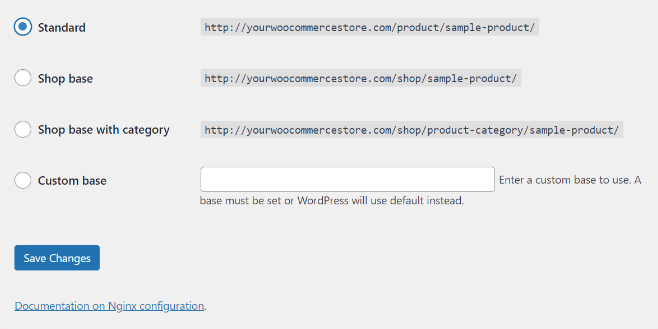
    The option that is recommended is the Standard structure.

    It’s important to note that you need to choose a permalink structure when starting your WooCommerce store. Changing link structures at a later point can impact your site’s SEO and cause errors within your website.

    Recreate Your Shopify Store’s Design

    At this point, you’re still using one of the default WordPress Themes so basically you have two options for how to approach your new design:

    1. Recreating the style of your Shopify store
    2. Starting over with a new WooCommerce template

    Both options are great so it’s really up to you and your decision on how you want your store to look.

    Configure Your WooCommerce Settings

    Importing products into WooCommerce and customizing your store’s style is just the beginning. Before you can start selling products via WooCommerce, you still need to configure a variety of settings, such as:

    • Payment and shipping options
    • Security settings
    • Email notification options
    • Product settings
    • Tax options

    The official WooCommerce documentation includes a complete guide on how to configure its settings.

    Wrapping Up

    Switching your site from Shopify to WooCommerce might feel like a big task, but with the right plan and some careful steps, you can make the move smoothly. Following this guide will help you transition with minimal hiccups, so your store stays up and running.

    Once you’re on WooCommerce, you’ll have the flexibility and customization to build an online store that really fits your business needs. Embrace the possibilities—your new, tailored e-commerce solution awaits!

  • WooCommerce vs Shopify: Which Is Better? (2024 Comparison)

    WooCommerce vs Shopify: Which Is Better? (2024 Comparison)

    Two e-commerce platform titans dominate the online store space: WooCommerce and Shopify. And for a good reason: they both offer powerful features to help build and grow thriving e-commerce businesses.

    But which one is the right fit for you? It’s not always an easy decision to make, especially with both platforms constantly evolving and improving.

    This comprehensive comparison will pit WooCommerce against Shopify and explore the two major contenders’ strengths, weaknesses, and differences. It will give you the lowdown on which one will help you crush your online store goals.

    Shopify vs. WooCommerce Features Quick Comparison Table

    FeaturesWooCommerceShopify
    Initial Setup Cost$0 (Open Source)$29 (Basic Plan)
    CustomizationHighModerate
    Themes Available1,500+160+
    UptimeVaries (99.95% with WPX)99.99%
    ScalabilityVaries depending on HostingNeed to Upgrade to more expensive plans.
    SEO ToolsExtensiveGood
    Hosting ProviderSelf-HostedShopify Hosted
    Blogging CapabilityStrongBasic
    Customer SupportVaries (24/7 & 30-second average support response time with WPX)24/7

    Overview of WooCommerce

    Since its launch in 2011, WooCommerce has been a major player in the e-commerce world. This open-source plugin has powered over 6.6 million online stores, accounting for a staggering 7% of global online sales.

    What Is WooCommerce?

    In a nutshell, it’s a customizable e-commerce plugin built for WordPress websites. It transforms your humble WordPress site into a full-fledged online store, complete with all the bells and whistles you need to sell products and process payments like a pro.

    Main Features and Benefits

    WooCommerce comes packed with a bevy of features and benefits that make it a go-to choice for online entrepreneurs:

    Flexibility and customization

    You can customize your WooCommerce store to your heart’s content. It seamlessly integrates with your existing WordPress theme, and you can tweak every aspect of your store’s design and functionality to match your brand’s unique style.

    Cost-effective

    As an open-source plugin, WooCommerce is free to download and use. You’ll only need to shell out for hosting, a domain name, and any premium extensions you fancy. This makes it a budget-friendly option for small businesses and startups looking to dip their toes into e-commerce.

    SEO-friendly

    Since WooCommerce integrates with WordPress, you can use the platform’s built-in SEO features to help your products rank higher in search engine results.

    Who Should Use WooCommerce?

    WooCommerce is a great option for a variety of business types, but here’s a breakdown of who might benefit the most:

    Budget-Conscious Entrepreneurs: WooCommerce is a cost-effective solution since it’s free to use, with expenses only for hosting, domains, and optional premium plugins or themes.

    Existing WordPress Site Owners: If you already have a WordPress site, WooCommerce is a natural extension. You can add e-commerce capabilities without switching platforms.

    Content-Driven Businesses: Since WooCommerce makes use of WordPress’s powerful content management system (CMS), it’s perfect for businesses that rely heavily on content marketing, such as blogs, tutorials, and informational websites.

    Web Developers: WooCommerce’s open-source nature gives developers full access to the source code, making it ideal for building highly customized solutions.

    Tech-Savvy Entrepreneurs: If you’re comfortable with some technical aspects of web management, WooCommerce has the tools to create a highly personalized e-commerce experience.

    Entrepreneurs Who Want to Own Their Data: Since WooCommerce is self-hosted, you have complete control and ownership of your store’s data.

    Overview of Shopify

    Shopify predates WooCommerce as an eCommerce platform by a number of years, first appearing in marketing in 2006 over 5 million online stores use Shopify.

    What Is Shopify?

    Shopify is a cloud-based eCommerce platform. It includes a storefront, inventory management, payment processing, and shipping tools, all neatly packaged in one user-friendly online store.

    Main Features and Benefits

    Shopify comes loaded with an impressive array of features that make it a top choice for online merchants:

    All-in-One Solution

    One of Shopify’s standout features is its comprehensive, all-in-one approach to e-commerce. From website hosting and store design to inventory management, payment processing, and shipping, Shopify has everything you need to run your online business smoothly.

    This integrated ecosystem eliminates the need to juggle multiple platforms or worry about compatibility issues, saving you time and headaches.

    Marketing and Sales Tools

    Shopify offers a range of built-in marketing and sales tools to help you grow your business. You can easily create and manage discount codes, set up abandoned cart recovery emails to recapture potential sales and integrate them with popular social media platforms to reach a wider audience.

    Who Should Use Shopify?

    Here’s a look at who would benefit most from using a Shopify store:

    Entrepreneurs with No Coding Experience: Shopify’s strength lies in its user-friendly interface and drag-and-drop functionality. Those with limited technical knowledge can easily set up and manage their store.

    Businesses Looking for a Quick Launch: Shopify offers a streamlined setup process to get your store up and running quickly.

    Brick-and-Mortar Stores Going Online: If you have a physical store and want to expand your reach by selling online, Shopify’s Point of Sale (POS) system can sync your offline and online sales, making it easy to manage your business across multiple channels.

    Feature Comparison

    Ease of Use

    Both WooCommerce and Shopify are relatively intuitive to use, even for those new to running an online store. However, Shopify has a bit of an edge here, especially for complete beginners. It offers a simple, step-by-step process for getting your store up and running quickly.

    WooCommerce is by no means difficult to learn, though. Plenty of follow-along tutorials on YouTube and other resources can show you the ropes. While WooCommerce may have a slightly steeper initial learning curve than Shopify, its flexibility means it can open up more opportunities for your store in the long run as your business grows and your needs evolve.

    So, in terms of ease of use, Shopify is the winner for those who want to get selling quickly with minimal fuss. At the same time, WooCommerce rewards those willing to invest a bit more time upfront to take advantage of its greater customization potential.

    Design and Themes

    When it comes to the look and feel of your online store, both WooCommerce and Shopify offer a range of free and premium themes to choose from. However, the selection differs quite significantly between the two platforms.

    Shopify provides around 100 theme options, including free and paid choices. The themes are easy to customize using the platform’s built-in drag-and-drop editor.

    In contrast, WooCommerce benefits from its integration with WordPress, which opens up access to a vast library of themes. There are thousands of options available, both free and premium, giving you much greater choice in terms of design.

    These themes come from various third-party developers and marketplaces, so the quality can vary. However, the sheer number of options means you’re more likely to find a theme that closely matches your brand’s style and requirements.

    Pricing and Costs

    The big difference between the two lies in their pricing structures. WooCommerce, as a plugin, is free to download and use. That’s all well and nice, but there’s not much you can do with it unless you pay out a little money. At a minimum, you will need hosting and a domain. From that baseline, there are many options for free or premium themes, as well as paid and free plugins to enhance your site’s functionality.

    You’ll also need an SSL certificate for secure transactions. Some hosting providers, such as WPX, will provide this for free. A domain will likely cost around $10-$20 a year.

    If we take WPX hosting as an example, plans for 1 WooCommerce store start at $29.17 per month. For three sites, it’s $62.50; for five, it’s $125 monthly. All come with 30-day money-back guarantee.

    On the other hand, Shopify operates on a subscription model with three main plans: Basic Shopify at $29 per month, Shopify at $79 per month, and Advanced Shopify at $299 per month when paid yearly. Each plan is for just one site but comes with increasingly advanced features reflected in the price. Shopify offers a free 3-day trial, and you can also test it out for a month at $1. As with WooCommerce, there are free and paid apps to extend your store’s capabilities.

    Shopify provides a free SSL certificate for your store and a free myshopify.com domain name. If you want your own branded domain, it will cost $14 yearly through Shopify. You can link it to your Shopify store if you have purchased it through another domain provider.

    Payment Options

    Both WooCommerce and Shopify offer various payment options to cater to different customer preferences and business needs.

    WooCommerce generally has lower transaction fees and doesn’t charge additional fees for using third-party payment processors. It’s more hands-on than Shopify, so you’ll be responsible for setting up and managing these integrations yourself.

    Shopify’s approach to payment processing is more user-friendly, with everything managed within the platform. However, you may face higher transaction fees, especially if you opt for a third-party payment provider.

    WooCommerce Payment Options

    WooCommerce Payments: This is WooCommerce’s native payment processor, which allows you to accept credit cards, debit cards, and local payment methods directly on your site. Transaction fees start at 2.9% + $0.30 per transaction for U.S.-issued cards.

    PayPal: WooCommerce integrates with PayPal, allowing you to accept customer payments worldwide.

    Stripe: This popular payment gateway is also available on WooCommerce, enabling you to accept credit card payments directly on your site.

    Other payment gateways: WooCommerce supports a wide range of other payment gateways, including Amazon Pay, Square, and Apple Pay, among others. Fees for these gateways vary.

    Shopify Payment Options

    Shopify Payments: This is Shopify’s built-in payment processor, which allows you to accept credit cards, debit cards, and other payment methods directly on your site. Transaction fees are 2.9% + $0.30 per transaction for online credit card payments.

    Third-party payment providers: Shopify integrates with over 100 third-party payment providers, including PayPal, Stripe, Amazon Pay, and Apple Pay. Transaction fees for these providers vary, and Shopify charges an additional fee of 0.5% to 2% per transaction, depending on your plan.

    Manual payment methods: Shopify also accepts manual payment methods, such as cash on delivery, bank transfers, and money orders. There are no transaction fees for manual payments.

    Search Engine Optimization

    SEO is crucial for driving organic traffic to your online store from search engines like Google. By optimizing your site’s content, structure, and technical elements, you can improve your rankings in search results and attract more potential customers to your store.

    Both WooCommerce and Shopify deliver a solid foundation for SEO, but WooCommerce has an edge due to its integration with WordPress and the wide range of SEO plugins available.

    Hosting also plays a part in this if you are running a WooCommerce store. Fast, reliable hosting with good server response times can improve your site’s loading speed. Google has indicated that site speed is one of the signals used by its algorithm to rank pages. Therefore, choosing a high-performance hosting provider such as WPX is a must.

    Customer Support

    WooCommerce Customer Support

    Community support: WooCommerce has a large and active community of users and developers. On the WooCommerce forums, WordPress.org forums, and various online communities, you can find answers to many questions and get help troubleshooting issues.

    Documentation: WooCommerce provides extensive documentation, including guides, tutorials, and FAQs, to help you set up and manage your store.

    Paid support: If you need more personalized assistance, WooCommerce offers a premium paid support package at $150 Per month

    Third-party support: Many WooCommerce theme and plugin providers offer their own support services, which can be a good option if you’re using their products.

    Managed WooCommerce Hosting sites: Some of the higher-quality hosting providers have highly trained dedicated support teams available if you run into trouble with your WordPress website. At WPX, we have one of the fastest response times on the market. Our customer support team will typically respond in less than 30 seconds and, in most cases, resolve your issues on the initial call.

    Shopify Customer Support

    24/7 support: Shopify features round-the-clock 24/7 customer support. You can reach out to their support team via live chat, email, or phone at any time, and they’ll be there to assist you.

    Help Center: Shopify’s Help Center is a comprehensive resource featuring articles, tutorials, and guides covering various aspects of setting up and running your store.

    Shopify Community: The Shopify Community is a platform where you can connect with other Shopify users, ask questions, and share knowledge.

    Shopify Experts: You can hire a Shopify Expert if you need more specialized assistance. These certified professionals can help with store setup, design, development, and marketing.

    Pros and Cons 

    WooCommerce

    ProsCons
    Free, open-source plugin with no monthly feesSteeper learning curve compared to Shopify.
    Highly customizable, with access to the source code and a large library of themes and pluginsWooCommerce itself has fewer built-in features than Shopify.
    Lower transaction fees compared to Shopify, especially when using third-party payment gatewaysPotentially slower loading times, depending on your hosting.
    You have complete control over your store’s data and hosting, unlike Shopify’s closed system.Limited customer support options.
    Strong SEO capabilities through WordPress, helping products rank higher in search engine results.Must arrange own hosting.

    Shopify

    ProsCons
    Requires minimal technical skills for setup.Limited customization options compared to WooCommerce
    24/7 dedicated support.Higher transaction fees, especially when using third-party payment gateways
    Shopify’s POS system enables seamless integration between online and offline sales.Monthly subscription costs can add up, particularly for stores with lower sales volumes.
    Built-in features for SEO, marketing, and analytics.Locked into Shopify’s ecosystem, migrating to another platform can be difficult.
    Scalable plans for businesses of all sizes.Less control over your store’s data and content compared to self-hosted solutions

    Other Options

    While WooCommerce and Shopify are two of the most popular e-commerce platforms, they’re not the only options available. You might consider exploring other alternatives:

    Magento is another open-source e-commerce platform particularly well-suited for large-scale businesses with complex requirements. To learn more about how Magento compares to WooCommerce, check out our in-depth article: WooCommerce vs Magento.

    BigCommerce is a hosted e-commerce solution with comprehensive features and tools for building and managing online stores. It offers a user-friendly interface and a wide range of integrations. For a detailed comparison, read our WooCommerce vs. BigCommerce guide.

    Wrapping Up

    So, to answer the question of which is better, ultimately, there’s no right or wrong choice between the two platforms. 

    When making your decision, consider your long-term objectives and not just short-term convenience. As your business grows and evolves, you may find that one platform suits your needs better than the other.

    If you’re interested in exploring either platform, both offer a way to test them out before committing. Shopify has a 30-day trial period for just $1, allowing you to experience the platform’s features and functionality first-hand.

    For those considering WooCommerce, WPX’s Managed WooCommerce Hosting includes a full refund within the first 30 days of signing up, no questions asked. This gives you an opportunity to set up your store and evaluate whether WooCommerce is the right fit for your business without any financial risk. If you want to migrate from Shopify to WooCommerce – here is our guide. Or switch to WPX, and we’ll do it for you!

    Whichever platform you choose, remember that success in e-commerce requires continuous learning, adaptation, and growth. Be prepared to invest time and effort into optimizing your store, marketing your products, and providing excellent customer service. With dedication and the right tools at your disposal, you can build a thriving online business on either WooCommerce or Shopify.

    Experience WPX WooCommerce Hosting  Risk-free, sign up now