
At WPX, we offer professional website speed optimization carried out by our dedicated in-house Optimization Team. If your site is underperforming or you’re aiming for better load times and performance scores, we’re here to help.
We provide one free optimization per website per customer, as this is a hands-on, time-intensive service performed by experienced experts.
Any additional optimization for the same website is a paid service, charged at USD 139 (excluding VAT).
Follow the steps below to request your optimization
Step 1. Log in to your WPX account
Begin by logging into your WPX account. You can do this by visiting the WPX login page.
Step 2. Access the Optimization form
Click the Optimize Site button from the top menu.

Step 3. Fill out the Optimization form
Complete the form by providing the following details:
- Hosting Plan – Select the hosting plan that contains the site you want optimized.
- Website – Choose the specific site for optimization.
- WordPress Admin Access – Enter the site’s WordPress Admin URL, along with the username and password.
- Issue Description – Briefly describe the speed or performance issues you’ve noticed.
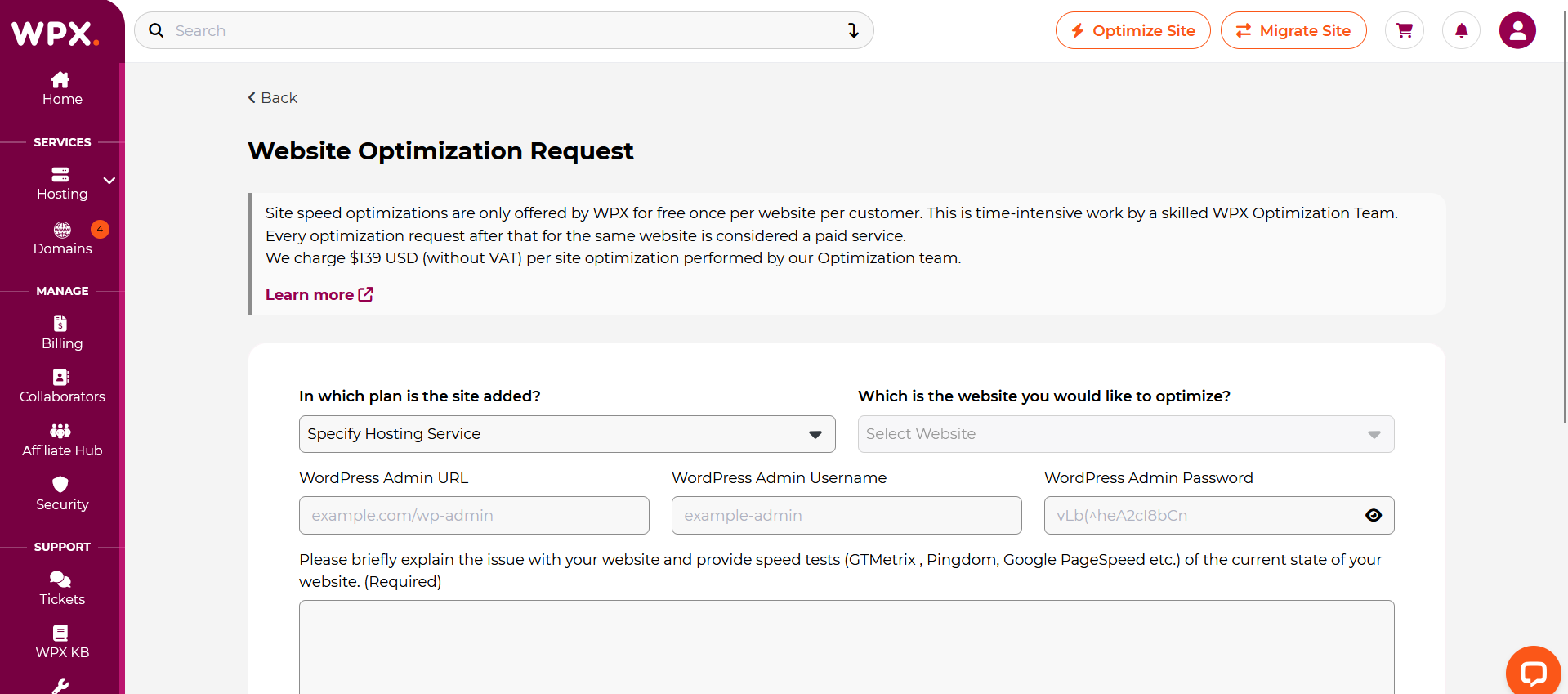
Once all information is completed, click Submit Request to send it to our Optimization Team.

Once you’ve selected the website and provided all necessary information, simply click Submit Request to complete and send the Optimization Form.
What Happens Next?
- A support ticket will be automatically created from your form submission.
- Our Optimization Team will review your request and respond with an estimated timeline and any follow-up questions, if needed.
- Most optimization requests are completed within 72 hours (3 business days).
- Requests submitted during weekends will be processed starting Monday, as optimization work is carried out Monday-Friday only.
Stuck at any point? Don’t worry, just click the live chat widget in the bottom-right, and one of our support agents will assist you in under 30 seconds.