You need your website to stay online and fast. However, if you are not a developer, maintaining servers can seem daunting. Website hosting and maintenance packages solve this problem by bundling everything your site needs to stay fast, secure, and available, making things much easier to manage.
What Is Website Hosting?
Website hosting is a service that allows individuals and organizations to make their websites accessible on the internet.
Hosting providers operate and maintain powerful, specialized computers called servers. These servers are designed to store website files securely and deliver them quickly to users. When someone types your domain name into their browser, their request is sent to the server that hosts your website. The server then retrieves your site’s files and displays them in the user’s browser.
In simple terms, web hosting is the service that stores your website’s data and ensures it can be viewed by anyone, anywhere, at any time via the internet.
Why is Website Hosting Important?
Web hosting is a fundamental part of your website’s performance, security, and reliability. A quality hosting provider offers fast loading times and stable functionality, which helps improve both user experience and search engine rankings. Reliable hosting also reduces downtime by handling server maintenance and updates.
Security features like SSL, regular backups, and disaster recovery help protect your data from risks. With technical support and monitoring tools, web hosting supports your website’s accessibility and long-term stability.
What is Website Maintenance?
Website maintenance is the process of monitoring, updating, and optimizing the website to keep it secure, functional, and relevant.
Maintenance involves checking the overall health and performance of your site. This includes applying software updates, installing security patches, updating plugins and tools, fixing bugs or broken links, and improving page load speed.
Beyond technical updates, website maintenance includes adding fresh and engaging content, monitoring traffic patterns, and making improvements based on user feedback.
Why is Website Maintenance Important?
Website maintenance is essential if you want your online presence to stay secure, work smoothly, and stand out from the competition. A site with a modern design that loads quickly and functions properly makes a strong first impression and helps build trust with visitors.
Regular tasks like updating your content, fixing broken links, and improving site speed can also boost your SEO and help maintain search visibility. If you run an ecommerce business, regular maintenance is especially important, as it helps prevent technical problems that could affect your sales or frustrate your customers. Additionally, applying security updates, renewing SSL certificates, and performing backups protect sensitive data from cyber threats.
In general, website maintenance ensures your site operates at full capacity, meets user expectations, and supports your business goals.
>>> Read more: How Long Does It Take to Build a Website?
What are Website Hosting and Maintenance Packages?
Website hosting and maintenance plans are bundled services designed to keep a website online, secure, and up to date.
The hosting portion provides the server infrastructure needed to store your website’s files and make them accessible to users via the internet. The maintenance typically includes tasks like software and plugin updates, security scans, regular backups, performance monitoring, bug fixes, and technical support, which help prevent downtime and keep the website running efficiently.
Website hosting and maintenance packages are commonly offered by web agencies, freelancers, and hosting companies as monthly or annual subscription plans. These plans combine technical infrastructure and support, making it easier for website owners to manage their sites.
What’s Included in Website Hosting and Maintenance Packages?
Website hosting and maintenance packages are best suited for business owners and organizations that rely on their website but do not want to manage the technical side themselves. Specific features included vary by service provider and plan level.
In general, hosting and maintenance packages include several key areas: infrastructure, technical maintenance, security, performance, and support.
Hosting Infrastructure:
- Server resources (Plans typically include shared or dedicated CPU, RAM, and high-speed SSD or NVMe storage)
- Bandwidth (determines how much traffic your site can handle)
- Domain connection and management
- SSL Certificate
- Email hosting
- CDN integration
- Server management (Providers handle server updates, configurations, and optimizations)
- Uptime monitoring
- Scalable resources (allow you to scale storage, RAM, or processing power as your traffic grows)
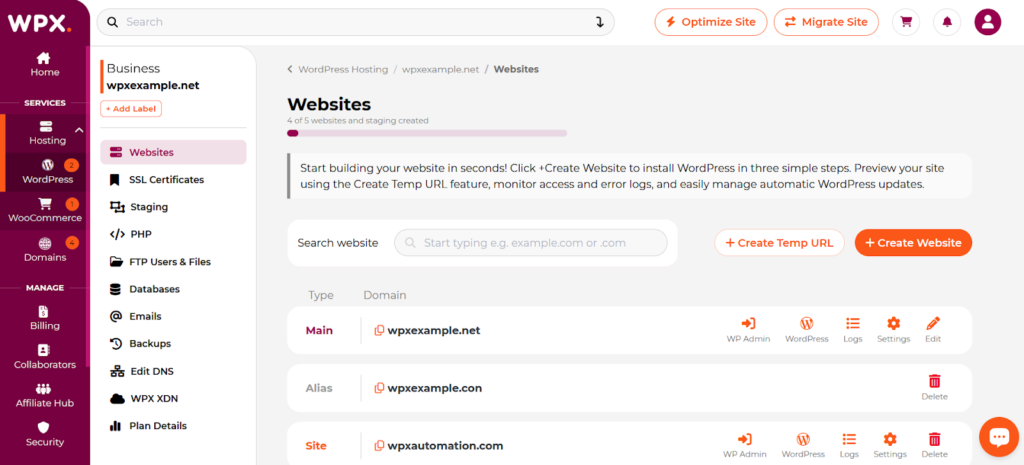
Managed hosting environment on WPX
Technical Maintenance:
- CMS & plugin updates
- Automated backups (daily, weekly, or monthly)
- Database optimization
- Uptime monitoring
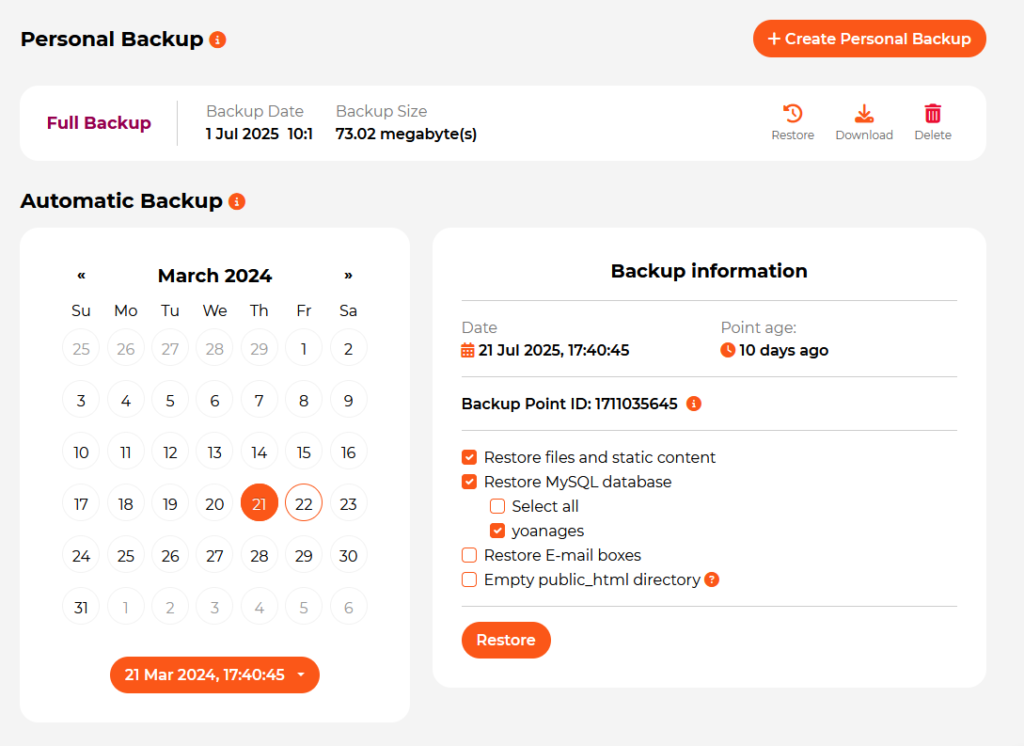
Automated backups on WPX Hosting
Security Monitoring:
- Malware scanning & removal
- Firewall & DDoS protection
- Vulnerability patching
- SSL management
Performance Optimization:
- Speed optimization (caching, image compression, code minification)
- Monitoring page load times and overall site health
- Core Web Vitals tracking
- Performance reports
Monitoring & Reporting:
- Uptime and performance summaries
- Security status reports
- Analytics overviews
- SEO health checks
- Accessibility compliance reviews
Technical Support & Administration:
- Technical assistance via email, chat, or phone
- Bug fixes and troubleshooting
- Plugin or theme conflict resolution
- Database management
- Dedicated support hours
Content & Functional Updates:
In higher-tier maintenance plans, you may find features such as:
- Text and image updates
- Adding new pages or blog posts
- Graphic adjustments
- Fixing broken links
- Testing forms and site functionality
- Minor feature additions or CSS fixes
Optional Add-Ons:
Some maintenance services may be available at an additional cost, such as:
- Advanced SEO campaigns
- Ecommerce product management
- Content writing and blog management
- Marketing automation setup
- Paid advertising or performance marketing support
5 Website Hosting & Maintenance Packages Examples for Different Business Needs
In this section, you’ll go through examples of service packages from WPX, a well-known hosting company. Looking at these examples will give you a clear idea of what to expect when you sign up for a website hosting and maintenance plan commonly offered by hosting companies. Each package combines hosting, maintenance, security, and support in a way that suits the typical requirements and budgets of different types of businesses.
Note:
WPX is a popular managed WordPress hosting service that handles maintenance, security, and performance for you. With every plan, you get fast servers, daily backups, malware protection, a built-in CDN, and 24/7 technical support.
Starter Plan
Best for: One high-performance WordPress site – ideal for solo entrepreneurs, small business owners, bloggers, and portfolio creators
Core Resources:
- Site slots: 1 Website
- Storage: 10 GB SSD
- Visitors: Unlimited
- Bandwidth: 100 GB
Performance Specs:
- 3 GB RAM
- 0.5 CPU Core
- 9 PHP Worker
| Category | Details |
| Site Slots | 1 Website |
| Storage | 10 GB SSD |
| Visitors | Unlimited |
| Bandwidth | 100 GB |
| RAM | 3 GB |
| CPU Cores | 0.5 Core |
| PHP Workers | 9 |
| Server Technology | LiteSpeed Servers with SSD Storage |
| Site Development Features | One-click WordPress installation Staging environment Collaborators & access control User activity logs Integrated file manager FTP/SFTP access PHPMyAdmin Access & error logs PHP version selector & management 20 MySQL databases |
| Security Coverage | Malware scanning & free removal Security patching & plugin risk scans Hybrid DDoS protection Brute-force protection Web Application Firewall (WAF) Domain WHOIS protection Free SSL certificates Bad bot throttling Automatic WordPress updates WPX Radar monitoring IP access restrictions |
| Backups | Automatic daily backups 28-day backup retention On-demand backups (personal use) |
| Performance Optimization | Custom high-speed global CDN (XDN) Dynamic content caching via CDN Automatic CDN cache clearing Full-page caching Anycast DNSDNS management OpCache optimization |
| Support | Fixed For You Guarantee 24/7 LiveChat support Ticket support Free site migration On-demand optimizations 30-day money-back guarantee |
The Starter Plan is a great choice for individuals or small businesses with one website, offering fully managed hosting and maintenance included (automatic WordPress updates, malware removal, daily backups, and 24/7 live chat support).
Business Plan
Best for: Growing small businesses managing multiple websites
Core Resources:
- Site slots: Up to 5 websites
- Storage: 20 GB SSD
- Visitors: Unlimited
- Bandwidth: 200 GB
Performance Specs:
- 5 GB RAM
- 1 CPU Core
- 15 PHP Workers
Key Features:
Includes everything from the Starter plan, plus:
- Business Email & Webmail
- Unlimited Mailboxes
- AI-Powered Email Protection
- Email Migration Support
- Temporary URL Access
The Starter plan is suitable for a single website, while the Business package is designed for companies that need more power and multiple websites. This one includes professional business email hosting, as well as AI-powered email security and email migration services.
Professional Plan
Best for: Scaling freelancers and small agencies
Core Resources:
- Up to 15 Websites
- 40 GB SSD Storage
- 400 GB Bandwidth
- Unlimited Visitors
Performance Specs:
- 15 GB RAM
- 2 CPU Cores
- 45 PHP Workers
Key Features: Includes everything from the Starter and Business plans, with enhanced performance resources and greater scalability to manage multiple websites.
This package is best suited for users managing larger portfolios of websites and needing stronger performance. Compared to the Business plan, it offers more scalability for traffic growth and client projects.
Elite Plan
Best for: Power users and high-traffic websites
Core Resources:
- Up to 35 Websites
- 80 GB SSD Storage
- Unlimited Bandwidth
- Unlimited Visitors
Performance Specs:
- 35 GB RAM
- 3 CPU Cores
- 105 PHP Workers
Key Features: Includes everything from Starter, Business, and Professional plans, plus Redis Cache.
The Elite plan supports more websites, more storage capacity, and unlimited bandwidth, allowing better handling of simultaneous visitors.
Agency Plan
Best for: Full-service agencies managing large client portfolios
Core Resources:
- Up to 200 Websites
- 300 GB SSD Storage
- Unlimited Bandwidth
- Unlimited Visitors
Performance Specs:
- 100 GB RAM
- 6 CPU Cores
- 300 PHP Workers
Key Features: Includes everything from all previous plans, plus enterprise-level scaling capacity for agencies handling many client sites.
While the Elite plan is suitable for high-traffic businesses and power users, the Agency plan is built for professional agencies managing hundreds of websites that require maximum scalability, performance stability, and fully managed hosting and maintenance support at scale.
Conclusion
If you are launching a simple website and working with a tight budget, the WPX Starter plan gives you a solid foundation. Hosting and maintenance are included, so you do not have to worry about technical details.
The right package should give you peace of mind and let you focus on growing your business. It should also be able to grow with you, starting out affordable and offering clear upgrade options as your needs change.
Start by honestly assessing where you are now: How much traffic do you get? How critical is uptime to your revenue? Do you have the technical skills to handle issues on your own, or do you need expert support? What’s your realistic monthly budget? Your answers to these questions point directly to which package tier makes sense.
Frequently Asked Questions
Have another question?
Setup costs vary widely depending on the type of site: a personal portfolio typically runs $100–$800, a small business site $2,500–$8,000, an e-commerce store $5,000–$25,000+, and enterprise builds $50,000–$150,000+. On the maintenance side, expect to spend $15–$60/year on a domain, $120–$1,200/year on hosting, and additional amounts on SSL certificates, plugin licenses, and managed maintenance services. Overall, most small and medium businesses spend a few thousand dollars to launch and $1,500–$5,000+ per year to keep things running.
Monthly maintenance costs generally fall into three tiers: $50–$150 for small sites and blogs, $150–$400 for small to medium business websites, and $400–$1,500+ for large or enterprise-level sites.
Website maintenance covers both technical and content-related tasks — updating software, applying security patches, fixing bugs and broken links, and optimizing page speed, as well as publishing fresh content, monitoring traffic, and making improvements based on performance data and user feedback.
For a local service business, $5,000–$8,000 is typically enough for a professional website. E-commerce stores should budget at least $10,000, since they require additional features like payment processing, product management, and more extensive testing.
Small business sites generally need 1–3 hours per month, covering weekly checks and a monthly performance review. E-commerce and high-traffic sites demand more — around 3–5 hours per week. Regardless of site size, daily backups are recommended, security patches should be applied within 24–48 hours of any identified vulnerability, and a monthly performance audit is good practice.